

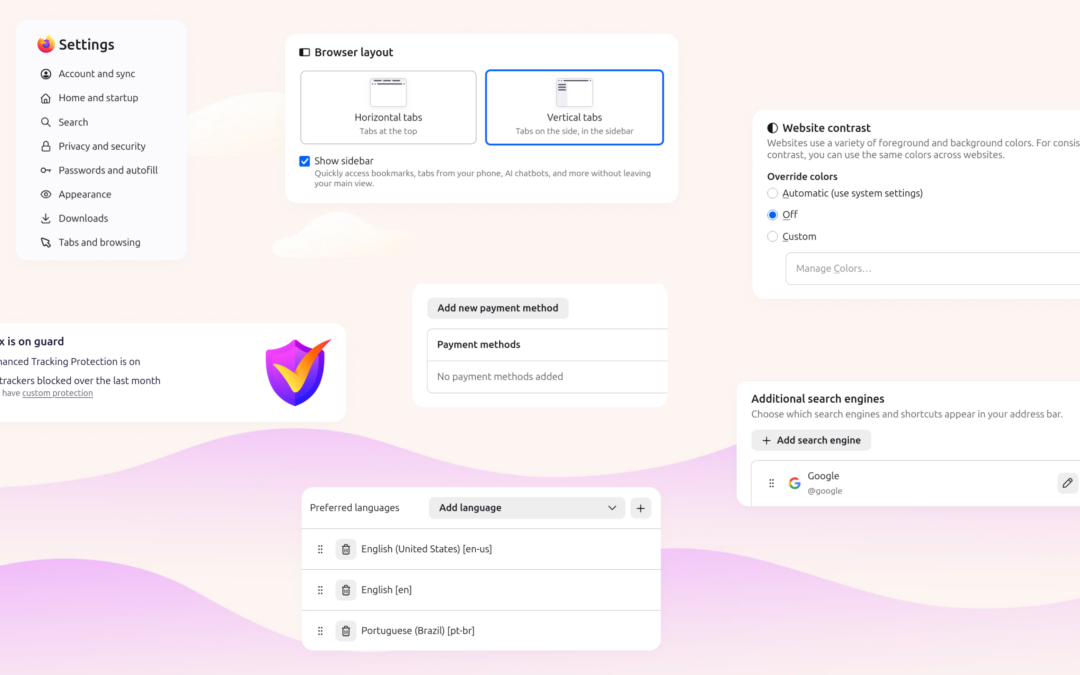
Mozilla has rebuilt Firefox’s settings from the ground up, retiring the long-running “General” page and grouping preferences into clearer categories. The change touches every Firefox user, but — importantly — it preserves every setting you already configured. If you have opened Firefox’s preferences in the past year, the layout you knew is now organized around what each option actually does rather than a single catch-all tab per Mozilla’s official announcement.
The General page is gone — and that’s the point
For years, Firefox funneled a sprawl of unrelated options into one “General” tab: your homepage, default search engine, language, fonts, zoom, startup behavior, and more. Over time that page became crowded, and related controls ended up scattered across different sections. The redesign deletes the General page entirely and redistributes its contents into purpose-built categories: Appearance, Accessibility, Languages, and Tabs and browsing as documented in the Mozilla announcement. The Passwords and Autofill areas also received a visual refresh, with before-and-after comparisons showing tighter grouping of related controls.
The goal is discoverability. Instead of hunting through a mixed bag, you now land in a category that matches the kind of change you want to make. Mozilla says the work was built on user research and direct community feedback gathered through Mozilla Connect, Reddit, and other official channels.
Where your favorite settings moved
If you are looking for something that used to live under General, here is the quick map:
| Old location (General) | New location |
|---|---|
| Homepage and new-tab behavior | Appearance |
| Default search engine | Search (retained) |
| Language and region | Languages |
| Fonts, colors, zoom | Accessibility / Appearance |
| Tabs and startup pages | Tabs and browsing |
| Scroll, drag, and general behavior | Tabs and browsing |
None of these options changed in function — only their address did. Your custom homepage URL, search default, privacy toggles, and installed themes all carry over untouched confirmed in Mozilla’s release notes for the current Firefox cycle.
The fastest way to find a moved setting
The single most useful addition is the settings search bar. If you do not know which category a control now lives in, type a keyword — “homepage,” “language,” “zoom” — and Firefox surfaces the exact toggle, even if its new home is not obvious. Mozilla Support notes the search bar works across every settings category, so you rarely need to memorize the new map see Mozilla Support: Access Firefox settings. For most people, the search bar alone removes the friction of the redesign.
How Firefox’s layout compares to Chrome and Edge
Firefox’s new structure is closer to how Chrome and Edge organize settings — both use a search-first, category-driven layout rather than a single dense page. The difference is that Firefox kept its settings fully local and sovereign: there is no forced account sync to browse your preferences, and the privacy and AI controls sit in the same tree as everything else rather than buried behind a sign-in wall. That matters for users who treat Firefox as the privacy-forward alternative; the redesign makes the browser easier to learn without nudging anyone toward cloud defaults.
Privacy and AI controls now sit alongside everything else
Because the redesign reorganizes by function, Firefox’s privacy toggles and AI assistant controls are now easier to reach from the main settings entry point. Mozilla has been steadily adding on-device and optional AI features; grouping them under clear categories (rather than a miscellaneous General tab) should reduce the “where did that setting go?” confusion that usually accompanies AI feature rollouts in other browsers.
How to get the update
The redesigned settings ship in the latest stable Firefox release. Open the menu, choose Settings (or type about:preferences in the address bar), and you will see the new categorized layout. No reconfiguration is required — your existing preferences migrated automatically, and the built-in search bar covers any option whose new location you cannot recall. If you manage Firefox deployments, the change is cosmetic to policy: managed preferences continue to apply; only the user-facing organization changed Mozilla Support documents the settings entry points.
Bottom line: Firefox’s settings redesign is a navigation improvement, not a behavior change. The legacy General page is retired in favor of Appearance, Accessibility, Languages, and Tabs and browsing, every prior preference is preserved, and the new in-settings search bar is the fastest way to find anything that moved.



