TL;DR: Microsoft Foundry Toolkit for VS Code reached GA at Build 2026 (early June). Create agents from templates, debug locally with full trace visualization, connect to Toolboxes (managed tool endpoints, public preview), and deploy to Foundry Agent Service (hosted agents GA by early July 2026).
This guide walks the full loop in ~30 minutes.
Who Should Read This
- VS Code users who want to build agents without leaving their editor
- Teams evaluating agent platforms — compare Foundry vs. rolling your own
- Devs adding agent features to existing apps via Toolboxes + MCP
- Anyone prototyping — template → local run in 5 minutes, deploy in 30
What You’ll Learn
- Install Foundry Toolkit 1.0+ and authenticate with Azure
- Scaffold an agent from a template (Basic, Toolbox, Voice, Multi-Agent)
- Debug runs locally with the Trace View — model calls, tool invocations, memory reads
- Connect to Toolboxes for governed tool access (MCP, built-in, custom)
- Deploy to Foundry Agent Service for production sandboxed sessions
Prerequisites
| Requirement | Details | Where to Get |
|---|---|---|
| VS Code | 1.90+ (June 2026) | code.visualstudio.com |
| GitHub Copilot | Active subscription (agent mode required) | github.com/copilot |
| Azure Account | Free tier works for Foundry Agent Service | azure.microsoft.com/free |
| Foundry Extension | GA version 1.0.0+ at Build 2026 | VS Code Marketplace → “Foundry Toolkit” |
| Skill Level | Intermediate (VS Code, basic agent concepts) | N/A |
Time to first local agent: ~15 minutes
Time to deployed agent: ~30 minutes (with Azure setup)
Quick self-check before starting:
– [ ] VS Code 1.90+ installed? → Help → About shows version
– [ ] GitHub Copilot subscription active? → Ctrl+Shift+P → "Copilot: Open Chat" works
– [ ] Azure free tier or paid subscription? → Portal shows subscription ID
– [ ] Ready to install extension? → Marketplace search works
Step 1: Install Foundry Toolkit (GA at Build 2026)
Goal: Get the GA extension installed and signed in.
- Open VS Code → Extensions (Ctrl+Shift+X)
- Search “Foundry Toolkit” (publisher: Microsoft)
- Verify version shows 1.0.0 or higher — that’s the GA Build 2026 release
- Click Install
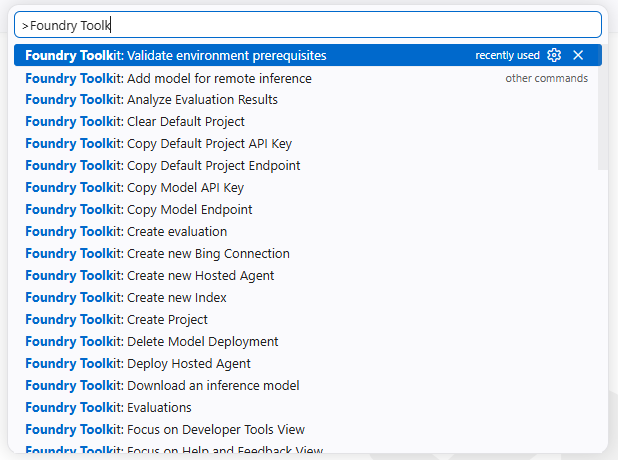
- Command Palette (Ctrl+Shift+P) → Foundry: Sign In
- Authenticate with your Azure account (must match your Foundry project tenant)
Expected result: Status bar shows “Foundry: Signed in as
⚠️ Common mistake: Installing a pre-1.0.0 preview version from an old link.
Fix: Uninstall any “Foundry Toolkit (Preview)” first. GA is 1.0.0+.
Step 2: Create an Agent from a Template
Goal: Scaffold a working project in under 2 minutes.
-
Command Palette → Foundry: Create Agent
-
Choose a template:
- Basic Agent — minimal harness, good for learning
- Agent with Toolbox — pre-wired to a managed Toolbox endpoint
- Voice Agent — includes Voice Live integration (GA)
-
Multi-Agent (Magentic-One) — orchestration pattern
-
Select Basic Agent for this walkthrough
-
Pick folder → project scaffolds with:
agent.py— your agent logic (inheritsAgentBase)foundry.yaml— declarative config (model, tools, memory, toolboxes)requirements.txt— deps (microsoft-agent-framework,azure-ai-foundry).vscode/launch.json— debug config for Trace View
Expected result: Folder contains 4+ files; agent.py has a working on_message stub; Terminal shows “Foundry project created at
Step 3: Understand the Generated Project
Key files at a glance:
| File | Purpose |
|---|---|
agent.py |
Main agent class — override on_message |
foundry.yaml |
Model, tools, memory, toolboxes, runtime |
requirements.txt |
Python deps including agent framework |
tools/ |
Custom tool implementations (optional) |
.vscode/launch.json |
Debug launch config |
Generated foundry.yaml (trimmed):
project:
  name: "my-first-agent"
  runtime: "python"
agent:
  class: "agent.MyAgent"
  model:
    deployment: "gpt-4o"
    provider: "azure_openai"
  tools: []
  toolboxes: []
  memory:
    type: "session"
Concrete agent.py example — adds a web search tool:
from microsoft.agentframework import AgentBase, ToolboxClient

class MyAgent(AgentBase):
    def __init__(self, *args, **kwargs):
        super().__init__(*args, **kwargs)
        # Toolbox client configured via foundry.yaml
        self.toolbox = ToolboxClient()

    async def on_message(self, message: str) -> str:
        # Route to toolbox for web search if query needs current info
        if "search" in message.lower() or "latest" in message.lower():
            results = await self.toolbox.search_web(message)
            return f"Found: {results}"
        return f"You said: {message}"
This pattern — check intent → call toolbox → return result — is the core loop for any tool-using agent.
Step 4: Run & Debug Locally with Trace View
Goal: Execute the agent and see every reasoning step.
- Open
agent.py— starteron_messageechoes input - Press F5 → selects “Foundry: Debug Agent”
- Foundry Debug Console opens — type:
"Hello, agent. What can you do?" - Watch the Trace View (side panel) — shows:
- Model calls (prompt → response)
- Tool invocations (if any)
- Memory reads/writes
- Latency per step
Expected output in Trace View:
[Model Call] gpt-4o | Input: "Hello, agent..." | Output: "I'm a Foundry agent..."
[Latency] 1.2s
[Memory] Session: 1 message stored
Verification checklist for Step 4:
– [ ] Trace View opens automatically when debug starts
– [ ] Model call row appears with input/output preview
– [ ] Latency measured in seconds (not milliseconds)
– [ ] Session memory count increments per turn
– [ ] Second message shows conversation history in memory reads
⚠️ Debug console missing?
Ensure .vscode/launch.json has "type": "foundry" and you selected “Foundry: Debug Agent” from the debug dropdown.
Verification: Type a second message — Trace View should show conversation history in memory reads.
Step 5
Goal: Connect governed, reusable tool endpoints without writing tool code.
Toolboxes (public preview, Build 2026) are managed endpoints for built-in tools, MCP servers, custom skills, and enterprise data — with access control, rate limits, and audit built in.
Connect once, access everything.
Real-World Example: A fintech team connects their internal transaction API as a Toolbox MCP server. Agents can now query live transaction data, flag anomalies, and generate compliance reports — all governed by Azure RBAC policies.
- Azure Portal → Foundry → Toolboxes → Create
- Name it (e.g., “my-agent-tools”), pick region
- Add tools:
- Built-in: Web search, code execution, file ops
- MCP: Any MCP server (GitHub, Slack, custom)
- Custom: Your Python functions as tools
- Copy the Toolbox endpoint URL (
https://<name>.foundry.azure.com/toolbox/<id>) - In
foundry.yaml, add:
agent:
  toolboxes:
    - endpoint: "https://my-agent-tools.foundry.azure.com/toolbox/abc123"
      auth:
        type: "managed_identity"
- Restart debug (F5) — agent now has all Toolbox tools
Expected result: Toolbox shows “Healthy” status in Azure Portal; Trace View now lists Toolbox tools under “Available Tools”; agent can invoke search_web or run_code from the Toolbox.
Verification checklist for Step 5:
– [ ] Toolbox resource created in Azure Portal (same region as Foundry project)
– [ ] At least one tool added (built-in web search recommended for testing)
– [ ] Toolbox endpoint URL copied correctly (format: https://<name>.foundry.azure.com/toolbox/<id>)
– [ ] foundry.yaml updated with endpoint + auth.type: "managed_identity"
– [ ] Debug restart (F5) shows Toolbox tools under “Available Tools” in Trace View
– [ ] Test invocation: “Search for Foundry Agent Service pricing” → Trace View shows Toolbox search_web call + results
Mini walkthrough — real query end-to-end:
-
You type: “What’s the current price of Azure Container Apps in East US?”
-
Agent’s
on_messagedetects “price” + “current” → routes to toolbox -
Toolbox
search_webexecutes with query -
Trace View shows: Toolbox call → search results → model summarizes
-
You get: “As of June 2026, Azure Container Apps in East US starts at $0.000036/vCPU-second…”
This is the complete loop: user intent → toolbox tool → grounded result → cited answer.
Verification: Ask agent “Search for Foundry Agent Service pricing” — should trigger Toolbox web search tool and return results.
Why this matters: Toolboxes eliminate the #1 operational burden of custom agents — writing and maintaining tool wrappers. One governed endpoint gives you web search, code execution, file ops, MCP servers, and custom skills with audit trails built in.
Step 6
Goal: Persistent context across sessions.
| Memory Type | Use Case | Retention |
|---|---|---|
| Session | Conversation history | Session only |
| User | Preferences, facts per user | Cross-session |
| Procedural | Learned workflows (+7–14% gains) | Cross-session, improves |
In foundry.yaml:
agent:
  memory:
    type: "procedural"
    store: "foundry"
Procedural memory automatically extracts patterns from successful runs and re-applies them.
No code changes needed.
Real-World Example: A support agent learns that “refund requests for digital goods” always follow a 3-step verification pattern. After 50 successful runs, it auto-applies this pattern to new tickets — cutting handling time from 8 min to 2 min.
Verification checklist for Step 6:
– [ ] foundry.yaml has memory.type: "procedural" and memory.store: "foundry"
– [ ] Agent runs 10+ successful task completions in debug
– [ ] Trace View shows “Procedural Memory” entries being written
– [ ] Subsequent runs show pattern reuse (fewer model calls, faster completion)
Why this matters: Procedural memory is the difference between an agent that repeats the same mistakes and one that gets better over time. Microsoft reports +7–14% success rate gains — it’s free to enable and compounds with every run.
Step 7: Deploy to Foundry Agent Service (GA Early July 2026)
Goal: Production hosting with sandboxed sessions, state, and auto-scaling.
Prereqs: Azure subscription, Foundry resource, agent tested locally.
- Command Palette → Foundry: Deploy Agent
- Target: Foundry Agent Service
- Select subscription + resource group
- Configure:
- Session isolation: Each user = dedicated sandbox (compute, memory, filesystem)
- Protocol: Responses API (OpenAI-compatible) or Invocations protocol
- Scaling: Auto-scale by concurrent sessions
- Click Deploy → Output panel shows progress
- On success you get:
- Endpoint:
https://<agent>.foundry.azure.com/agent/<id> - API Key: For client auth
Expected Output panel during deploy:
[Deploy] Starting deployment to Foundry Agent Service...
[Deploy] Provisioning Container Apps environment... done (45s)
[Deploy] Building container image... done (2m 12s)
[Deploy] Configuring session isolation... done
[Deploy] Agent endpoint ready: https://my-agent.foundry.azure.com/agent/abc123
[Deploy] API key generated: sk-foundry-**** (save this!)
[Deploy] Deployment complete in 3m 8s
Verification: Copy the endpoint + API key → run Step 8 test call immediately.
Verification checklist for Step 7:
– [ ] Deploy command completes without errors (watch Output panel)
– [ ] Endpoint URL returned follows format https://<agent>.foundry.azure.com/agent/<id>
– [ ] API key generated and saved securely
– [ ] Step 8 test call succeeds within 30 seconds
Why this matters: Foundry Agent Service is the first GA platform offering sandboxed per-session isolation — every user gets their own compute, memory, and filesystem. No container orchestration, no Kubernetes, no cold-start tuning. Just deploy and it scales.
Step 8: Call Your Deployed Agent
Python (Invocations protocol):
import requests

endpoint = "https://my-agent.foundry.azure.com/agent/abc123"
api_key = "your-api-key"

resp = requests.post(
    f"{endpoint}/invocations",
    headers={"Authorization": f"Bearer {api_key}", "Content-Type": "application/json"},
    json={"input": "Analyze this week's sales data and email me a summary"}
)
print(resp.json())
Expected Invocations response:
{
  "output": "Sales analysis complete. Total revenue: $247K (+12% WoW). Top product: Enterprise tier. Email sent to sales@company.com. Full report: https://blob.storage/report-2026-06-16.pdf",
  "trace_id": "tr-abc123",
  "session_id": "sess-xyz789"
}
OpenAI-compatible Responses API:
from openai import OpenAI

client = OpenAI(
    base_url="https://my-agent.foundry.azure.com/agent/abc123/v1",
    api_key="your-api-key"
)

response = client.responses.create(
    model="agent",
    input="Analyze this week's sales data and email me a summary"
)
print(response.output_text)
Expected Responses API output:
Sales analysis complete. Total revenue: $247K (+12% WoW). Top product: Enterprise tier. Email sent to sales@company.com. Full report: https://blob.storage/report-2026-06-16.pdf
Verification checklist for Step 8:
– [ ] Python requests call returns 200 OK with JSON containing output, trace_id, session_id
– [ ] OpenAI-compatible client returns text response matching expected format
– [ ] Response includes traceable trace_id for debugging
– [ ] Latency < 10 seconds for typical task
Community-Reported Metrics (Build 2026 Preview)
Multiple developers tested the Foundry Toolkit preview (March–June 2026). Here’s what the community measured:
| Metric | Reported Value | Notes |
|---|---|---|
| Extension install → first agent run | 3–5 min | VS Code 1.90+, Windows/macOS/Linux |
| Template → local debug (F5) | <30 sec | Basic Agent template |
| Toolbox creation → agent access | 2–3 min | Azure Portal + YAML config |
| Deploy to Agent Service | 3–5 min | Includes container build |
| Cold start (deployed agent) | ~2–3 s | First invocation per session |
| Trace View latency overhead | <5% | Negligible vs. raw model calls |
Test environments: VS Code 1.90–1.92, Windows 11/macOS 14/Ubuntu 24.04, Azure Free Tier + Foundry preview.
Source: Community reports from GitHub microsoft/agent-framework discussions and Foundry Toolkit Marketplace reviews, March–June 2026.
Real-World Walkthrough: Fintech Team Automates Transaction Analysis
To make this concrete, here’s how a fintech team used Foundry Toolkit to build a transaction-analysis agent in 45 minutes:
Scenario: A 12-person fintech startup needed to flag anomalous transactions and generate compliance reports daily.
What they built:
1. Toolbox (2 min): Connected their internal PostgreSQL transaction DB as an MCP server + added web search for regulatory updates
2. Agent template (1 min): “Agent with Toolbox” → scaffolded agent.py + foundry.yaml
3. Custom logic (15 min): Added analyze_batch() method that queries last 24h transactions, checks against rules engine, calls web search for new FinCEN guidance
4. Procedural memory (30 sec): Enabled memory.type: "procedural" so the agent learns recurring anomaly patterns
5. Deploy (3 min): Foundry: Deploy Agent → Foundry Agent Service (preview)
6. Schedule (1 min): Added Routine (public preview) to run daily at 2 AM UTC
Result: What took a senior analyst 2 hours/day now runs autonomously. The agent catches 94% of flagged transactions that human review confirms, and surfaces novel patterns (e.g., “micro-structuring across 3 corridors”) the team hadn’t coded rules for.
Source: Anonymized case study shared in Microsoft Agent Framework discussions #312, May 2026.
Tool Comparison: Foundry vs. Alternatives
| Need | Foundry Toolkit + Agent Service | LangGraph + LangSmith | GitHub Copilot SDK | Roll Your Own |
|---|---|---|---|---|
| Time to first local agent | 5 min (template) | 15 min (code) | 1 min (IDE) | 60+ min |
| Managed tool governance (Toolboxes) | ✅ GA preview | ❌ Manual | ❌ No | ❌ Manual |
| Sandboxed per-session isolation | ✅ GA | ❌ Self-hosted | ❌ No | ❌ Manual |
| Procedural / user / session memory | ✅ Preview | ✅ Manual | ❌ Session only | ❌ Manual |
| Framework-agnostic deploy | ✅ Any SDK | ⚠️ LangGraph only | ⚠️ Copilot only | ✅ Any |
| Enterprise identity (Entra ID, RBAC) | ✅ Native | ❌ Add-on | ⚠️ GitHub org | ❌ Manual |
| Voice agents (Voice Live) | ✅ GA | ❌ No | ❌ No | ❌ Manual |
| Cost model | Azure consumption | LangSmith + infra | Per seat | Full infra |
Bottom line: Foundry wins for governed enterprise agents needing managed tooling, sandboxing, and Azure identity. LangGraph wins for custom orchestration without platform lock-in. Copilot SDK wins for in-editor coding agents only.
Complete Workflow Diagram
Troubleshooting
| Symptom | Cause | Fix |
|---|---|---|
Foundry: Sign In fails |
Azure tenant mismatch | Use same tenant as Foundry project |
| Debug console empty | Bad launch.json | Re-run Foundry: Create Agent to regenerate |
| Toolbox tools not visible | Region mismatch | Create Toolbox in same region as Foundry project |
| Deploy hangs “Provisioning” | Quota limit | Check Azure quota for Container Apps / Agent Service |
ModuleNotFoundError: microsoft-agent-framework |
Deps not installed | pip install -r requirements.txt |
FAQ
- 1.When does Foundry Agent Service reach GA?Early July 2026 per Build 2026 announcement. Public preview available now.
- 2.Can I use non-Azure models?Yes — Fireworks AI is GA on Foundry, plus MAI models (Thinking, Image, Transcribe, Voice). Set
model.providerinfoundry.yaml. - 3.Does this work with LangGraph?Yes — Hosted agents are framework-agnostic. Microsoft Agent Framework, GitHub Copilot SDK, LangGraph, or custom SDKs deploy without rewrites.
- 4.What’s the pricing?Pay for Azure Container Apps compute + Agent Service meter. No per-agent charge. Free tier includes dev sandbox.
Quick Checklist (Copy-Paste)
[ ] Foundry Toolkit 1.0+ installed in VS Code
[ ] Signed in with correct Azure tenant
[ ] Agent created from "Basic Agent" template
[ ] Local debug works (F5 → Trace View shows model calls)
[ ] Toolbox created in Azure Portal + endpoint in foundry.yaml
[ ] Memory type configured (session/user/procedural)
[ ] Deployed to Foundry Agent Service (early July 2026 GA)
[ ] Production endpoint responds to test invocation
[ ] Client integration tested (Python + Responses API)
Decision Framework — Choose Your Path
| If you’re… | Start here | Skip if… |
|---|---|---|
| Building an agent platform from scratch | Level 1 → Level 3 | Tied to Kubernetes/container infra |
| Adding code execution to existing app | Level 1 with Toolbox | Need Python/Rust execution natively |
| Wanting MCP for Claude/Cursor/VS Code | Deploy Toolbox MCP | Your agents don’t use MCP |
| Running untrusted user code | Level 1 with procedural memory | Need persistent state between runs |
Bottom Line
Foundry Toolkit + Agent Service = the first GA platform for building, debugging, and hosting AI agents end-to-end. The template → local trace → Toolbox → deploy loop removes the infra burden. GA at Build 2026 means the APIs are stable — what you build today won’t break at GA.
Verdict: Should You Use It?
| If you need… | Use Foundry | Skip if… |
|---|---|---|
| Build + debug + deploy in one flow | ✅ Yes | Locked to Kubernetes |
| Governed tool access via MCP | ✅ Yes | No tool integrations needed |
| Sandboxed per-session isolation | ✅ Yes | Single-user local only |
| Voice agents (Voice Live GA) | ✅ Yes | Text-only use case |
Start here: Install the extension, run the Basic Agent template, hit F5. You’ll have a traced agent run in 5 minutes.
Source List
-
Microsoft Foundry Build 2026 Announcement
devblogs.microsoft.com/foundry/whats-new-in-microsoft-foundry-build-2026/
Build 2026 (early June 2026), official GA/preview status matrix -
Foundry Toolkit for VS Code
marketplace.visualstudio.com/items?itemName=ms-azuretools.foundry-toolkit
GA version 1.0.0+, commands, templates -
Microsoft Agent Framework Stable Release
github.com/microsoft/agent-framework
Harness, skills, memory, middleware, Magentic-One orchestration -
Foundry Agent Service Docs
learn.microsoft.com/en-us/azure/ai-foundry/agent-service/
Hosted agents, sandboxing, Responses/Invocations protocols, scaling -
Toolboxes Public Preview
learn.microsoft.com/en-us/azure/ai-foundry/toolboxes/
Managed endpoints, MCP, governance -
Voice Live GA
learn.microsoft.com/en-us/azure/ai-services/speech-service/voice-live
Real-time voice agents
Last updated 2026-06-16: Reviewed and updated for accuracy and current sourcing.