GitHub and a coalition of AI tooling companies published Agent Plugins 1.0 on August 6, an open standard that packages agent skills and MCP servers into one installable plugin governed independently of any single vendor (GitHub Changelog). The release matters because a developer can now write an integration once and have it run across every compatible agent client, rather than rebuilding the same logic for each tool’s own packaging format.
Before the spec existed, shipping a plugin to several agents was already possible, but it cost teams real duplication (GitHub Changelog). The skill and the MCP server beneath it were identical for every client, yet the manifest and directory layout wrapped around them were not, so maintainers shipped a separate package per agent. Agent Plugins 1.0 collapses that overhead into a single portable bundle.
A plugin can tie a skill directly to the MCP server it depends on, such as a deployment runbook packaged alongside the tool integration it calls (GitHub Changelog). Keeping the skill and its backing server in the same installable unit means the instructions and the tooling they rely on cannot drift apart as a plugin moves between clients.
The specification launched with AWS, Anysphere, Microsoft, OpenAI, and Vercel as maintainers, and Google joined as a core maintainer on the same August 6 publish date (GitHub Changelog). Independent governance is the whole point: because the format is not owned by one company, no single vendor can change the contract unilaterally and break every other client that depends on it.
Independent governance also shapes how the format evolves over time. Because the spec lives outside any one company’s product roadmap, a bug fix or a new component rule has to be agreed by the maintainer group rather than dictated by a single vendor’s release plan, which gives teams a steadier target to build against (GitHub Changelog). For a library author, that stability is the difference between writing once and re-testing after every competing release.
Agent Plugins 1.0 is generally available today in VS Code, the Copilot CLI, the GitHub Copilot SDK, and the GitHub Copilot app, on every Copilot plan (GitHub Changelog). Plugins built for older GitHub Copilot releases stay supported with no migration required, so teams can adopt the new standard on their own schedule instead of facing a forced rewrite of working code.
The no-migration promise is worth stressing for teams sitting on existing Copilot plugins. Those packages keep working exactly as they are, so adopting 1.0 is an optimization rather than a deadline, and a team can convert one plugin at a time without breaking the others (GitHub Changelog). The portable contract only adds a standardized home for skills and MCP servers on top of what already exists.
For a reader who has not followed the MCP side of this, the practical definition is simple. A skill is a packaged instruction set an agent can load, and an MCP server is the bridge that lets that agent call an external tool or API. Agent Plugins 1.0 says both should travel together, so an instruction that assumes a specific tool keeps that tool attached (GitHub Changelog).
Installing a spec-compliant plugin starts from a marketplace. The Awesome Copilot marketplace ships registered by default in VS Code, the Copilot CLI, and the Copilot app, and compatible clients pull the skills and MCP server configuration they support from the same package (Awesome Copilot). From a terminal you install a community plugin with copilot plugin install <plugin-name> @awesome-copilot, and one installed package then serves every client that understands the format.
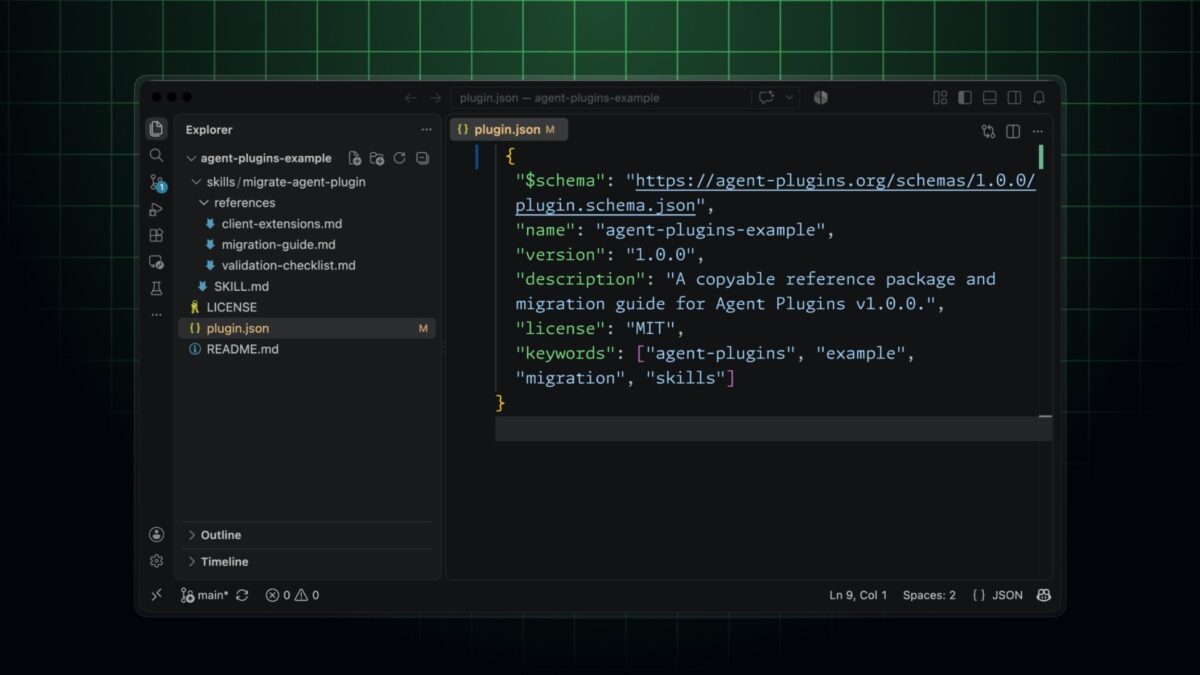
Adopting the spec is mostly manifest work for anyone who already maintains a plugin. You add $schema to plugin.json, keep skills under skills/ and MCP configuration in mcp.json, and move Copilot-specific files into a com.github.copilot/ directory that other clients simply ignore (GitHub Changelog). That namespaced directory is the trick that keeps a plugin portable without giving up Copilot-only behavior such as custom agents, commands, rules, and hooks.
The official build guide lays out the smallest valid package as a root plugin.json next to a skills/greet/SKILL.md file, with MCP servers added in a root-level mcp.json using the same 1.0 schema version (Agent Plugins spec). Because the format fixes where each component lives, a skills-capable client can load plugin.json, discover the immediate children of skills/, and validate each SKILL.md against the Agent Skills specification without bespoke per-plugin logic.
Pinning $schema to the 1.0 version pays off immediately in editor feedback. A client or IDE can validate plugin.json against the published schema and surface a malformed skill path or a missing mcp.json key before the package is ever installed, which removes a whole class of silent breakage (Agent Plugins spec). Root-level mcp.json also keeps every tool wiring in one place instead of scattered across client-specific configuration.
For organizations, portability raises a governance question: which plugins should developers actually be allowed to install? Copilot Business and Enterprise customers answer that with the enterprise managed settings they already use across VS Code, the Copilot CLI, the Copilot app, and the Copilot cloud agent (GitHub Changelog). In managed-settings.json, enabledPlugins installs or blocks named plugins, extraKnownMarketplaces adds new sources developers can reach, and strictKnownMarketplaces locks installation to a managed list.
Those plugin and marketplace controls combine additively with team-specific overrides, and enterprise values set the baseline everyone inherits (GitHub Changelog). Because a plugin can also carry MCP server configurations, the changelog recommends pairing plugin governance with MCP allowlists that approve or block individual servers by URL, command, or name.
The spec deliberately stops at the package format. Client-managed installation, distribution, enablement, updates, and user interface are explicitly outside the portable contract, so each vendor can still differentiate its marketplace and settings experience while honoring the same plugin shape (GitHub Changelog). The CLI and the Copilot app additionally load client extensions such as canvases from the namespaced directory, which keeps those richer surfaces available without breaking portability.
The Copilot CLI’s surface keeps widening beyond the plugin format itself. GitHub Enterprise 3.22’s release candidate brings offline Copilot CLI use, a meaningful step for regulated environments that cannot send code to a cloud assistant (GitHub Enterprise 3.22 RC enables offline Copilot CLI use). The same client that runs plugins is therefore also becoming viable in air-gapped workflows where network calls are prohibited.
Model choice inside Copilot is expanding in parallel. Microsoft’s MAI-Code-1.1-Flash recently landed in GitHub Copilot, giving teams a smaller first-party model option alongside the larger hosted ones (Microsoft’s MAI-Code-1.1-Flash lands in GitHub Copilot). A portable plugin standard becomes more valuable precisely when the clients it targets keep adding both deployment modes and models.
Consider a concrete case. A team that ships a “deploy to staging” skill alongside the MCP server that performs the deploy previously had to wrap that same skill and server once per client, repeating the manifest and directory work for each one. Under 1.0 the team publishes a single package and lets every compatible client discover the skill and its server from the same file (GitHub Changelog). The duplicated packaging effort becomes a one-time cost instead of a recurring tax on every new agent.
The practical takeaway for a developer is straightforward. If you maintain an agent integration today, you can move it to Agent Plugins 1.0 with a small, well-defined manifest change and immediately reach VS Code, the Copilot CLI, and the Copilot app from one package (GitHub Changelog). The larger shift is governance and reach: an open, vendor-neutral format means the plugin you write once is no longer locked to a single assistant’s packaging rules, and your organization can still control exactly which plugins ship to its developers.
Editorial note: Citation cleanup: we trimmed duplicate citation links that repeated the same source after multiple paragraphs. Every fact and quote is unchanged; the source remains cited where each claim appears.