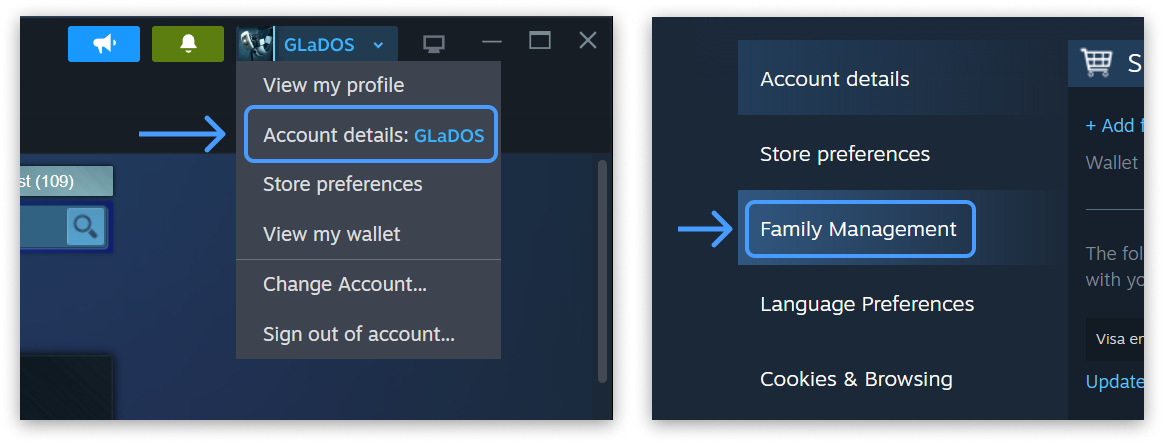
Steam Families rolled out in 2024 and folded both the old Family Sharing and Family View into one control panel. The feature lets a household manage up to 6 accounts under a single family group, as detailed in Valve’s Steam Families User Guide & FAQ. The interface for this setup is shown in Valve’s Steam Family Management interface.
If you and the people you live with have been buying the same games twice, or you want to lend your library to a kid without handing over your login, this is the feature to set up. Below is the whole process, start to finish, based on Steam’s official family setup documentation.
What do you need before creating a Steam Family?
A Steam account in good standing is required, meaning no active VAC ban that would revoke family privileges. Valve expects close family sharing one home, and each family can hold up to 6 members total.
The people you invite should be part of your household because slots carry a one-year cooldown if someone leaves. You can manage a family through the Steam client, the mobile app, or a browser.
Nothing needs to be installed because the tool is pure account settings. Ownership of every game stays with the person who bought it, while sharing only makes the library visible to the other 5 members.
The previous Family View PIN is removed after migration, but its restrictions carry over into the new parental controls. This means legacy limits still apply once you create a family.
How do you create a Steam Family?
Open your Account Details page on the Steam store by going to Profile then Account details. Click the Family Management section to proceed.
Hit Create a Family and name it, with the option to rename later. That action makes you the first adult in a one-person family.
From there, everything else is invites and settings. The entire setup requires no download and no payment.
You are now the sole adult until you invite others. The family begins with 1 of 6 possible seats filled.
How do you invite the rest of the household?
In Family Management, click Invite a Member to start. Search for each person by Steam nickname or email.
Pick their role as Adult, who can manage invites and restrictions, or Child, who is subject to parental controls and cannot manage the family. Invited members get a notification and must accept.
Adults can leave whenever they want, but if they do, they cannot join or create a new family for one year. The slots themselves also sit on a one-year cooldown after someone vacates them, which is why Valve nudges users toward genuine household members rather than online friends.
A family maxes out at 6 members, so you can invite up to 5 others. Only invite people you actually live with to avoid the cooldown penalty.
When you create a family, Steam recommends your previous Family Sharing partners for invites. This bridges the older system into the new one without manual lookup.
How does game sharing work in a Steam Family?
Once everyone is in, a new Family Library appears in each member’s games list. Anyone can play a shared game as long as it is not already being played by someone else who owns that exact copy.
The rule that trips people up is that sharing is per copy, not per game. The example Valve uses in its own guide describes a family of four where you own one copy of Portal 2 and one copy of Half-Life.
At any moment one member can play Portal 2 while another plays Half-Life. If two people want Portal 2 at the same time, someone must buy a second copy.
After that purchase there are two owned copies across the family, and any two members can play it together. Games with VAC anti-cheat or that a publisher has flagged as unshareable simply will not show up in the family library.
If a family member cheats or commits fraud while playing your shared game, your family privileges can be revoked and your account risks a VAC ban. Invite trusted people only, and never share your password.
Ownership of every game stays with the buyer, so a child who plays your copy earns separate saves. The per-copy limit applies even if the family has 6 members and only 1 copy of a title.
How do you turn on parental controls for a child?
An adult locks down a child account from the same Family Management screen. Expand the child’s entry under Manage and toggle Enable Parental Controls.
Set game-access permissions, Steam Store, community, and chat restrictions, plus playtime limits. You also get playtime reports and can approve requests for extra time or for a purchase.
Children can send a shopping-cart request to an adult, who pays and approves from the mobile app or email. The game lands straight in the child’s account.
Save games, achievements, and workshop items stay tied to the original account and do not transfer to a newly created child account. Do not expect a clean slate to inherit old progress.
If a child ever gets locked out, an adult who has been in the family at least 30 days can run the Recover Account wizard to reset their credentials. This 30-day threshold is specified in Valve’s guide.
A child cannot manage the family or change their own restrictions. Only an adult with at least 30 days tenure can recover the child login.
How do you leave or recover a Steam Family?
Adults leave anytime, but with the one-year rejoin cooldown noted above. Children can only be removed by an adult or Steam Support.
You can always rejoin the last family you were in without waiting, as long as it is under 6 members. Recovering a child uses the Recover Account button after the 30-day mark.
If a slot is vacant, it remains on a one-year cooldown before a new member can fill it. Plan invites around that constraint to keep the family at full 6 capacity.
Troubleshooting common Steam Families issues
A user may see the message “I can’t join the family.” Usually one of three reasons applies: account activity does not look like the same household, the user is still on cooldown from a previous family, or the family’s slots are still in cooldown. Steam tells you how much time is left on the cooldown when you try.
Another case is “A game is locked in the family library.” Someone else is playing that specific copy. Check the Steam client to see who, and the game unlocks when they stop.
Some users report “My old Family Sharing setup disappeared.” It did not; Steam now recommends your previous share partners when you create a family. Set one up and invite them.
Finally, “Family View settings are gone” is explained by migration into Steam Families parental controls. The PIN is removed, but the restrictions carry over and can be adjusted under the child’s Manage panel.
If a child account was newly created, its save data starts empty because workshop items and achievements stay with the original owner. This is expected behavior per the guide.
People also ask about Steam Families
Can two people play the same game at once? Only if the family owns two copies. One copy equals one simultaneous player, even across the family of up to 6.
What happens to my saves and achievements on a shared game? They are tied to the account playing, not the copy. A family member playing your Portal 2 keeps their own saves and achievements separate from yours.
Is there a cost to join a family? No. Steam Families is free, and you only pay when someone buys a second copy to enable simultaneous play.
Can I be in more than one family? No. You belong to one family at a time, and leaving triggers the one-year cooldown before you can join or start another.
Edge cases worth knowing
A couple of situations trip people up, both called out in Valve’s FAQ. If you were invited as a Child by mistake, you can’t just flip the role yourself — child accounts are meant for parents to create for their kids, so you’ll need to contact Steam Support to be removed. And if a child account gets stuck, remember the Recover Account button only appears 30 days after they joined the family and is only visible to adults, so don’t panic if it’s missing in the first month. None of this affects the games or saves already on the adult accounts — Families is additive, not destructive.
What happened to the old Family View PIN? The PIN is removed, but restrictions migrated into Steam Families parental controls. Adjust them under the child’s Manage panel.
Does Steam suggest previous share partners? Yes, when you create a family, Steam recommends your previous Family Sharing partners for invites. This bridges the older system into the new one.
What if a child is locked out? An adult who has been in the family at least 30 days can run the Recover Account wizard. This resets the child’s credentials without Support intervention.
Can a child manage the family? No, a Child role cannot manage invites or restrictions. Only an Adult role has those privileges.
How many members can a family have? A Steam Family holds up to 6 members, meaning the creator can invite up to 5 others. The limit is fixed by Valve’s design.
What is the slot cooldown after someone leaves? Both the leaving adult and the vacated slot carry a one-year cooldown. This prevents rapid family hopping.
Quick checklist for Steam Families setup
[ ] Open Account Details → Family Management
[ ] Create a Family and name it
[ ] Invite household members (Adult or Child)
[ ] Confirm they accepted the invite
[ ] Spot the new Family Library in your games list
[ ] For kids: enable Parental Controls + playtime limits
[ ] Verify a shared game launches for a family member
Why a Steam Family is worth setting up
For a household with up to 6 players, a family pays for each game once instead of per person for non-overlapping play. If all 6 want to play the same title at the same moment, the family must own 6 copies under the per-copy rule.
For parents, the mix of playtime limits, purchase approval, and access restrictions means a kid gets a real account without a free-for-all. The feature supports playtime reports and cart requests processed within 30 days of adult membership.
It is the single biggest quality-of-life change Steam made to shared gaming, replacing two legacy systems in 2024. The setup is account settings only, with no client install required.
A family of four using the Portal 2 and Half-Life example from the guide can cover two simultaneous players with two total copies. Adding a third copy would raise that to three players of the same title.
The one-year cooldown on slots means a mistaken invite costs a seat for 12 months. The 30-day child recovery wait ensures only established adults reset credentials.
Bottom line: Open Account Details then Family Management, create a family of up to 6 members, invite up to 5 household members as adults or children, share your library under the per-copy rule, and switch on parental controls from the same screen. Respect the one-year slot cooldown and the 30-day child recovery threshold to avoid lockouts.
Source: Valve’s official Steam Families User Guide & FAQ.