A coding agent that can install tools, start databases, and run integration tests is exactly what you want in CI — until a stray command wipes a shared volume or leaks a secret. Docker’s new sbx runtime answers that risk by giving the agent broad freedom inside a throwaway virtual machine while the host runner stays completely untouched.
GitHub Agentic Workflows added Docker Sandboxes as a supported agent runtime in July 2026 Docker blog, and the integration shipped in gh-aw version 0.82.9. After this guide you will run a Copilot-backed agent on GitHub-hosted Ubuntu that finds a real bug, fixes it, and opens a draft pull request — without ever handing that agent the keys to your CI host.
What GitHub Agentic Workflows actually runs
GitHub Actions still schedules the job, provides the Ubuntu runner, manages permissions and secrets, and records the result. On top of that foundation, GitHub Agentic Workflows (gh-aw) is an open-source CLI extension that compiles a Markdown workflow into a standard Actions file GitHub Agentic Workflows. You describe the agent’s task in prose beneath YAML frontmatter, then run gh aw compile to emit a .lock.yml workflow that Actions runs unchanged.
The relationship is deliberately simple: a Markdown source becomes a compiled workflow that runs on ubuntu-24.04, enters a Docker Sandbox, starts the agent, and cleans up afterward. Built-in engines include GitHub Copilot, Claude Code, OpenAI Codex, Google Gemini, and Pi, and the project documents that agent jobs run read-only and sandboxed by default GitHub Agentic Workflows. Writes normally flow through a separate, permission-scoped safe-outputs job, so the agent influences your repository only through an approved path.
Why a microVM beats a shared runner
It is tempting to read “Docker” and assume one shared application container, but the sbx setup uses a microVM as the real isolation boundary. Every sandbox gets its own kernel, filesystem, network stack, and a private Docker daemon, so the agent holds full root inside the VM without ever reaching the host’s Docker daemon Agent Runtime Selection. The only bridge between the two is the shared repository workspace.
Because the agent’s private daemon is isolated, it can run Testcontainers and spin up PostgreSQL exactly as a developer would on a local machine. The host runner exposes no container socket to the agent, which is the entire point of the boundary. When you choose a runtime, the published guidance is to prefer the default Docker runtime for compatibility, gVisor when untrusted code warrants a smaller host-kernel surface, and Docker sbx only when a hardware-virtualized boundary is required and the runner exposes working KVM. A self-hosted Linux runner needs an appropriate KVM-capable setup plus the Docker and system access Docker Sandboxes require, so the hosted ubuntu-24.04 runner remains the easiest place to try this.
Install the gh-aw extension
Start from a repository with GitHub Actions enabled and a Copilot entitlement. Install the extension from your terminal with gh extension install github/gh-aw, then verify the runner baseline the sandbox needs: docker version, docker info, docker compose version, and docker run --rm hello-world. A conventional runner should already satisfy these checks before you provision any specialized runtime. Self-hosted runners need the same baseline plus KVM access, because the microVM boundary depends on hardware virtualization rather than a container namespace.
The compiled Docker Sandbox runtime authenticates with Docker credentials, so add DOCKER_USERNAME and DOCKER_PAT as repository secrets under Settings > Secrets and variables > Actions. Alternatively, let the GitHub CLI prompt you with gh secret set DOCKER_USERNAME and gh secret set DOCKER_PAT. Finally, enable “Allow GitHub Actions to create and approve pull requests” in the repository’s Actions settings.
Repositories without a Copilot entitlement can fall back to a supported COPILOT_GITHUB_TOKEN secret documented by gh-aw. The sample’s successful run used the repository Copilot entitlement plus copilot-requests: write, which is sufficient for the agent to open its draft pull request without broader write scope.
Write the sandbox workflow file
Create .github/workflows/sandbox-explorer.md with YAML frontmatter that selects the sbx runtime and a Markdown body that tells the agent what to accomplish. The three lines under sandbox.agent choose the Docker Sandbox runtime, while the network block allowlists only the destinations the job actually needs.
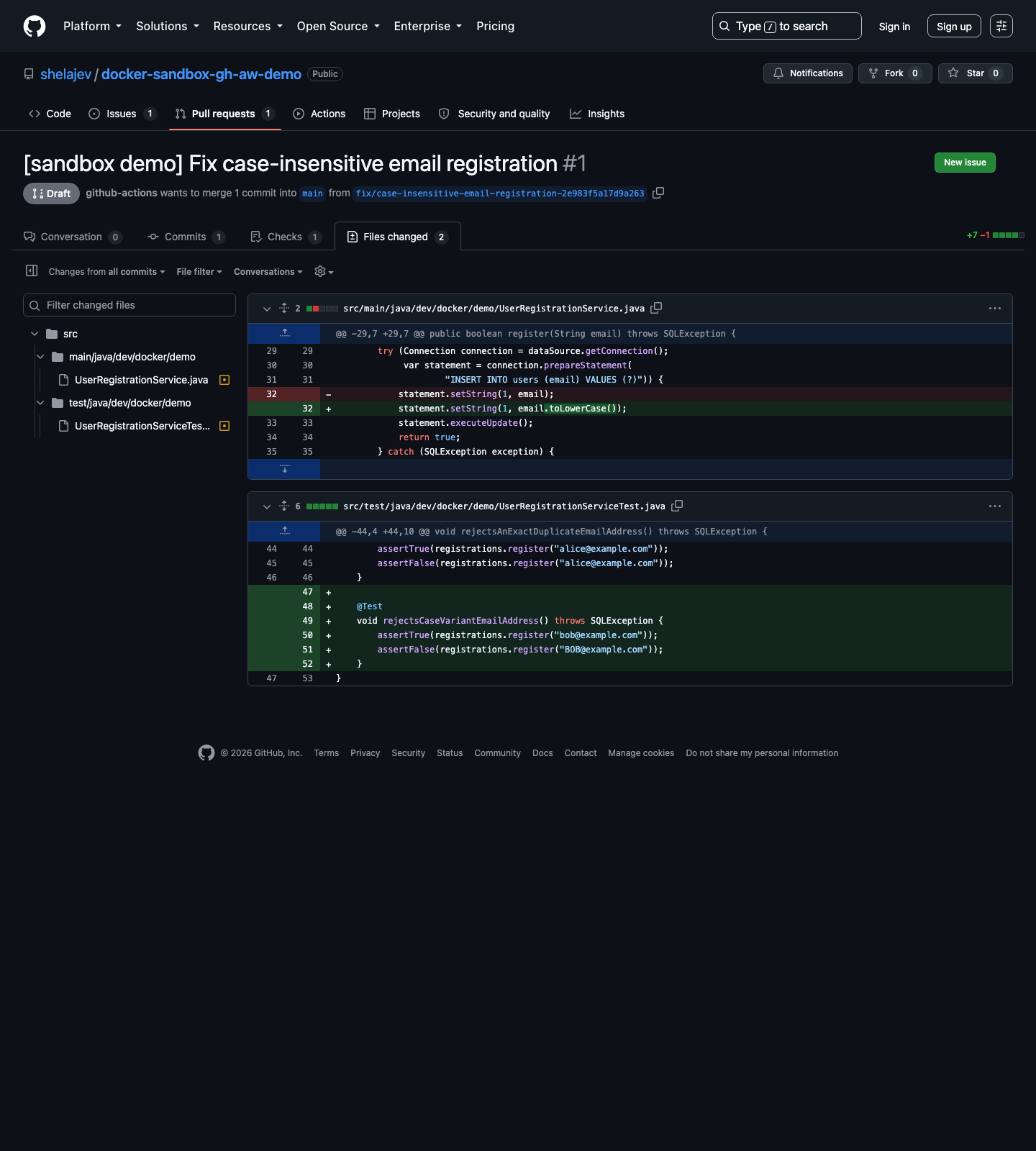
Inside the sandbox the agent receives sudo and unrestricted shell access to build the application and start its test infrastructure. Outside it, the surface is deliberately small: a network allowlist, read access to repository contents, and requests to Copilot. Pull request creation happens in a separate safe-outputs job whose patch may contain files only under src/**, and the draft flag keeps the result pending human review.
The frontmatter also sets permissions so the workflow can read contents and request Copilot, and engine: copilot selects the model. Those choices are what keep the agent useful inside the sandbox yet constrained outside it, instead of granting blanket access to the runner or its secrets.
Compile and push the workflow
Compile the Markdown source into a standard GitHub Actions workflow, then commit both the source and the generated file. Changes always belong in the Markdown source; run compile again after any edit so the .lock.yml stays in sync.
gh aw compile sandbox-explorer
git add .github/workflows/sandbox-explorer.md \
        .github/workflows/sandbox-explorer.lock.yml
git commit -m "Compile Docker Sandboxes sample workflow"
git push
The .lock.yml is generated code, so you never edit it by hand. The compiled file installs the sandbox tooling, authenticates it, checks the runner, starts the agent, and tears everything down afterward. This is the step that turns a readable Markdown file into a real, repeatable CI job your team can review.
What the agent does in the sandbox
The sample targets a small Java 21 registration service whose requirements say email addresses are case-insensitive. The seeded implementation stores addresses as provided and relies on PostgreSQL’s case-sensitive unique constraint, while an existing Testcontainers integration test catches only exact duplicates Docker blog.
The workflow asks the agent to read the requirements and source, run the baseline suite, then add a PostgreSQL Testcontainers test for two addresses that differ only in letter case. If the invariant fails, the agent should make the smallest source correction. Guardrails tell it not to modify dependency manifests, workflow files, scripts, documentation, or generated files, and not to weaken existing tests.
Those guardrails matter because they keep the agent’s blast radius inside src/. The task is plain Markdown beneath the frontmatter, which is what makes the workflow easy to read and audit before you ever run it on a real branch. The seeded defect is intentional: it exists so the demonstration shows the agent reasoning about a real invariant rather than a contrived syntax error, which is the kind of bug a human reviewer would otherwise catch late.
Hand the build to a private daemon
The test launcher runs Maven inside a pinned container, passing the sandbox’s Docker socket through so Testcontainers can start PostgreSQL. Pinning the Maven image by digest keeps the build reproducible, and the socket hand-off is what lets the private daemon serve the database the tests need.
docker run --rm \
  --add-host=host.testcontainers.internal:host-gateway \
  -e TESTCONTAINERS_HOST_OVERRIDE=host.testcontainers.internal \
  -v "$PWD:/workspace" -w /workspace \
  -v /var/run/docker.sock:/var/run/docker.sock \
  maven:3.9.9-eclipse-temurin-21@sha256:3a4ab3276a087bf276f79cae96b1af04f53731bec53fb2e651aca79e4b10211e \
  mvn --batch-mode "$@" test
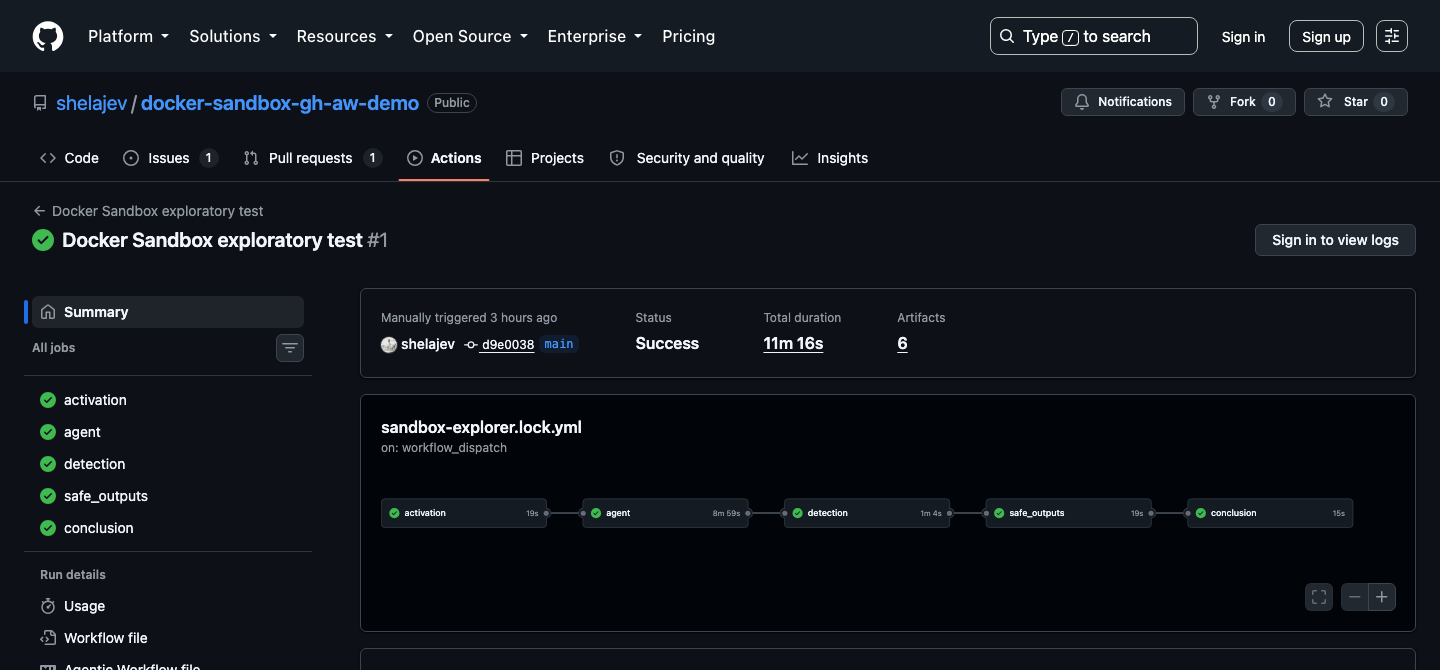
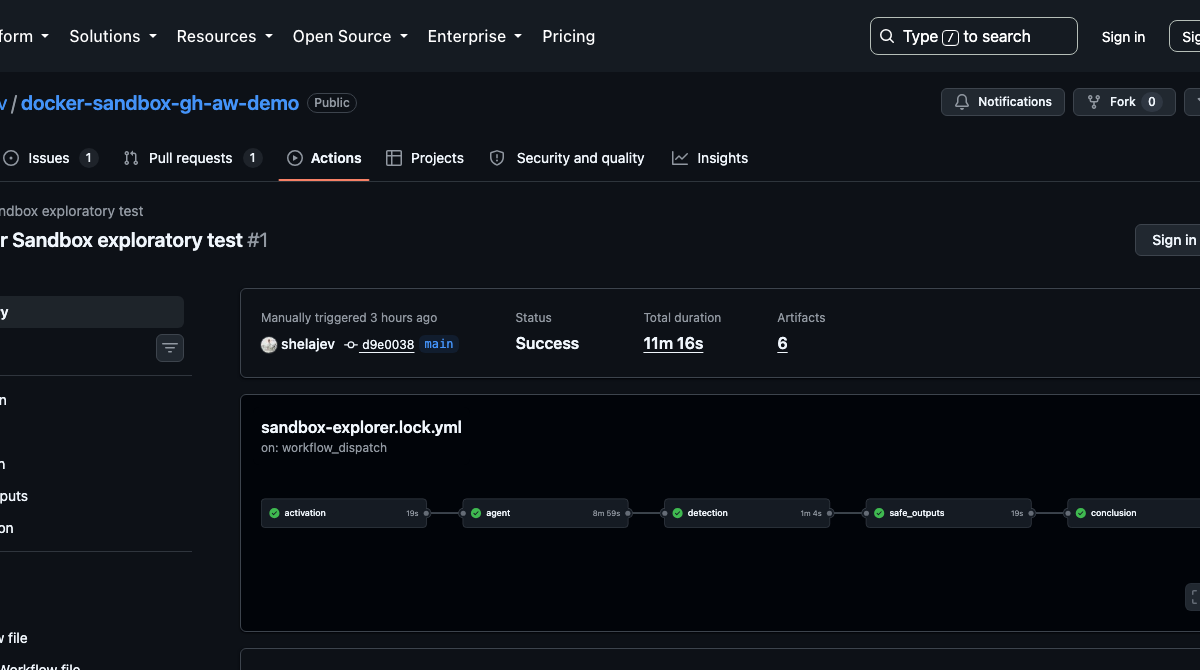
In the documented run the baseline passed, then the new case-variation test failed, and the agent normalized the email, reran the suite, and opened a draft PR with the regression test and a one-line fix Docker blog. The compiled workflow finished in roughly eleven minutes on a hosted ubuntu-24.04 runner, and the safe-output job kept the patch inside the declared src/** boundary.
Watch the run and review the draft PR
Start the workflow and stream its progress from your terminal with gh aw run sandbox-explorer followed by gh run watch. The run breaks into activation, agent, detection, safe_outputs, and conclusion jobs, and only the safe-outputs job may write a pull request. You can follow each stage as it completes. Before touching the application, the agent records uname, the Docker version, and a tiny Alpine container run, leaving specific evidence in the workflow log about where the work executed.
You get the agent’s changes as an ordinary pull request you can read, comment on, and merge on your own schedule. The workflow configuration, scripts, dependencies, and documentation stay outside the allowed patch surface, so the draft PR contains exactly the regression test and the minimal fix. The same sandbox idea also appears in Docker’s agent work on firmware builds Docker pairs ESP32 firmware with AI agent sandboxes, and the wider move is explored in how AI agents are reshaping developer workflows GitHub says AI agents reshape developer workflows.
Docker’s isolation model matters because useful coding agents do more than suggest patches — they run commands, start services, and discover surprising new meanings for the word “cleanup.” Pairing that autonomy with a hardware-isolated sandbox keeps the blast radius small, and the same policy and audit model extends from CI runners to team laptops through Docker AI Governance. If you want to feel the boundary before committing to it, run sbx run around an agent on a local project first; the workload is your real development loop, not a contrived demo.