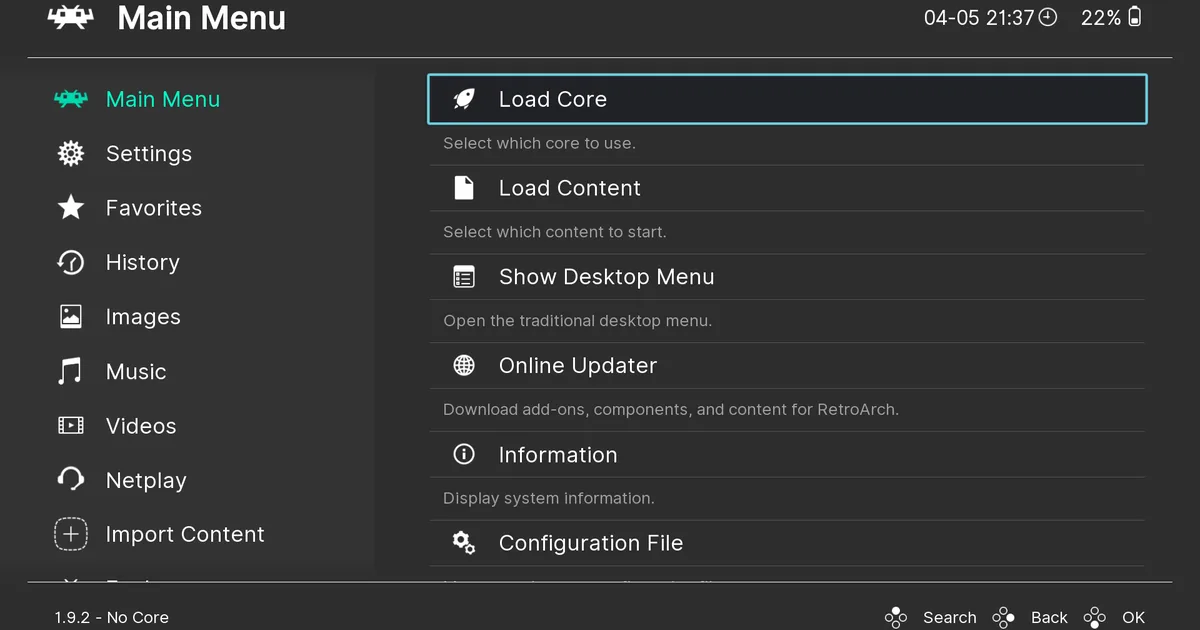
RetroArch is a free, open-source frontend that unifies more than 200 emulator, game engine, and media cores into a single cross-platform interface, eliminating the need for users to run separate standalone apps for every retro gaming system.
By consolidating all legacy content management, configuration, and playback into one tool, it removes the overhead of maintaining dozens of independent emulator installs, unique control mappings, and fragmented save file locations. The project is maintained by the non-profit Libretro organization, and all code is publicly available on GitHub for community auditing and contribution RetroArch Official Site.
Unlike single-system standalone emulators, RetroArch uses the open-source Libretro API to load dynamically swappable “cores” — lightweight, system-specific emulator binaries — on demand RetroArch Official Site. This architecture is the core differentiator: instead of maintaining separate installs, config files, and controller mappings for each emulator, users manage all their retro content from one unified interface.
The Libretro API is designed to be hardware-agnostic, meaning cores built to the specification run identically on x86 desktop CPUs, ARM mobile chips, and even legacy console hardware like the PlayStation 3 and Wii U without modification RetroArch Official Site.
How RetroArch unifies emulator cores
The Libretro API defines a standardized lifecycle for emulator and multimedia cores, meaning any core built to the specification works across any Libretro-compatible frontend, not just RetroArch RetroArch Official Site. This open standard is the foundation of RetroArch’s core library: the official repository includes more than 200 cores spanning retro consoles, 1980s home computers, classic game engines, and legacy media players RetroArch Official Site. Cores are distributed as single, self-contained binaries, so users do not need to install additional dependencies or runtime libraries to run most content.
For example, the LRPS2 core is a PlayStation 2 emulator built with a Vulkan-powered low-level renderer that uses GPU acceleration to match software rendering accuracy while supporting enhancements like 4x supersampled antialiasing for sharper output on modern displays RetroArch Official Site.
The PX68K core emulates the Sharp X68000, a Japanese home computer released between 1987 and 1993 that was popular for arcade game ports and homebrew development RetroArch Official Site.
DOSBox Pure is a plug-and-play core for MS-DOS and Windows 9x games with built-in savestates and 10-second rewind functionality, eliminating the need for users to configure DOS mount points or memory settings manually RetroArch Official Site.
OpenLara is a Tomb Raider core that adds modern graphical effects like dynamic lighting while retaining the original game’s 1996 art style, and it runs at native 4K resolution on supported hardware RetroArch Official Site. All cores in the official repository are tested for compatibility and stability before release, with a community review process to flag broken or low-quality cores.

RetroArch cross-platform support and built-in features
RetroArch runs natively on 10 distinct platforms: Windows, macOS, Linux, Android, and iOS, plus official ports for legacy consoles including PlayStation 3, PSP, PS Vita, Wii, and Wii U RetroArch Official Site. It is also fully compatible with the Steam Deck handheld gaming PC, with official support listed on the Steam store page, and is accessible on Xbox Series X/S and Xbox One consoles via the xbox.com/play web ecosystem without requiring a separate download Steam Deck Store Page Xbox Play. The interface uses a set-top box-style menu that auto-scans game libraries, sorts titles by their corresponding system, and supports thumbnail art and animated backgrounds for quick visual browsing, with support for custom theme packs created by the community RetroArch Official Site.
Next-frame response time eliminates input latency to match the performance of original hardware, FPGA-based clones like the Analogue Pocket, or retro console accessories like the RetroTINK 5x, ensuring that button presses register with the same timing as they would on a 1990s console RetroArch Official Site.
Shaders can replicate the look and feel of CRT monitors, including scanlines, screen curvature, and phosphor bloom, or apply custom graphical filters for a modern aesthetic, and multiple shaders can be stacked for custom hybrid effects.
For users with NVIDIA GPUs, select RetroArch cores leverage DLSS 3 technology to deliver higher-resolution output with minimal performance overhead, with some cores reporting up to 2x performance gains at 4K resolution compared to native rendering NVIDIA DLSS.
Built-in netplay supports hosted or joined multiplayer sessions with spectator mode for up to 16 concurrent viewers, and users can adjust netplay settings to compensate for internet latency to reduce input lag during online play RetroArch Official Site.
Automatic controller configuration maps common gamepads on plug-in, eliminating the need for manual setup when multiple players use different devices like Xbox, PlayStation, or Switch controllers, with support for custom button mapping and analog stick sensitivity adjustment saved per core RetroArch Official Site.
Practical implications for retro gaming users
For users who maintain game libraries spanning multiple retro systems, RetroArch eliminates the overhead of managing separate emulator installs, individual config files, and unique controller mappings for each app RetroArch Official Site. A user with titles spanning NES, SNES, PlayStation, Sega Genesis, and DOS games can scan their entire library of 100+ titles in under 2 minutes via the built-in scanner, launch any title from a single unified menu, and use the same controller profile across every core without manual reconfiguration, cutting setup time for new systems from 15+ minutes per core to under 30 seconds RetroArch Official Site. The unified interface also centralizes save files and savestates, so users do not need to navigate separate folder structures to back up or transfer progress between systems.
The open-source nature of the Libretro ecosystem means core development is distributed across a global community of more than 1,000 registered contributors, rather than tied to a single company’s product roadmap RetroArch Official Site.
Cores are updated independently based on community demand, with some cores receiving weekly updates to fix bugs or add compatibility for new game titles, and users can download new or updated cores directly via RetroArch’s built-in updater without leaving the app RetroArch Official Site.
The project also accepts community-submitted cores for review, so niche or lesser-known systems can be added to the official repository if they meet the Libretro API specification.
One caveat for mobile users: app store versions of RetroArch for Android and iOS may have restricted functionality compared to desktop builds RetroArch Official Site. These restrictions stem from platform-specific policy limits on emulation and file access, which can block features like BIOS file loading for systems that require system firmware (such as the PlayStation 2 or Sega Dreamcast) and external storage game scanning for libraries stored on SD cards or connected drives RetroArch Official Site.
Users who need full functionality on mobile can sideload the open-source APK for Android directly from the RetroArch website, bypassing app store restrictions, though iOS sideloading requires a paid developer account due to Apple’s platform policies RetroArch Official Site. Desktop builds for Windows, macOS, and Linux have no such restrictions and support all core features, including BIOS loading, external storage scanning, and custom shader packs.
Frequently asked questions about RetroArch
- 1.Is RetroArch legal to use?RetroArch itself is legal [to download](https://zbrandco.com/nova-lands-free-epic-games-store/) and use, as it is free, open-source software with no bundled copyrighted content RetroArch Official Site.
Users are responsible for obtaining legal copies of any game BIOS files or game ROMs they run through RetroArch, in compliance with local copyright law.
- 2.Does RetroArch work with all retro game systems?The official RetroArch core repository includes more than 200 cores covering most mainstream retro consoles, 1980s home computers, classic game engines, and legacy media players, from the 1977 Atari 2600 to the 2006 PlayStation 3 RetroArch Official Site.
Niche or very recent systems may have limited core support, but the open-source nature of the Libretro ecosystem means new cores are added regularly by community contributors.
- 3.Can RetroArch run on a Steam Deck?Yes, RetroArch has official support for the Steam Deck handheld gaming PC, listed on the official Steam store page for the device Steam Deck Store Page.
It runs natively in SteamOS, supports the Deck's built-in controls and touchscreen, and can be added to the Steam library as a non-Steam game for quick access.
- 4.Is RetroArch better than standalone emulators?For users who play games across 3 or more retro systems, RetroArch reduces overhead by consolidating all cores, configs, and controller mappings into one interface, with setup times for new systems taking under 30 seconds compared to 15+ minutes for standalone emulators RetroArch Official Site.
For users who only play games on a single retro system, standalone emulators may offer more specialized features or higher compatibility for that specific system. Bottom line: RetroArch is the most convenient option for users who play games across 3 or more retro systems, as it eliminates the friction of managing separate emulator apps.
Its open-source Libretro core ecosystem, spanning more than 200 emulator, game engine, and media cores, ensures long-term support for even the most niche and legacy systems, with new cores added weekly by the global contributor community RetroArch Official Site.
Users who only play games on a single retro system may prefer a standalone emulator for specialized features, but multi-system users will see immediate time savings from RetroArch's unified interface.
Editorial note: Citation cleanup: we trimmed duplicate citation links that repeated the same source after multiple paragraphs. Every fact and quote is unchanged; the source remains cited where each claim appears.