An autonomous agent grinding through a multi-step task hits a paid API at 3 a.m. and stalls. No human is awake to swipe a card. That gap — what an agent can do versus what it may pay for — is what Amazon Bedrock AgentCore payments and OpenClaw now close.
This walkthrough shows how to give a local OpenClaw assistant a payment path it can use on its own, within a budget a human approves first. A bounded wallet lets the agent settle the small, programmatic charges that paid APIs and content endpoints now expect, instead of stopping dead whenever a human is not at the keyboard.
The toll booth your agent keeps hitting
Some APIs, content services, compute endpoints, and Model Context Protocol tools answer a request with an HTTP 402 Payment Required response instead of data; the agent must settle that charge before the call continues, and a human cannot sit at every transaction when it runs unattended for hours. Stablecoins matter here because traditional payment rails impose minimum processing fees that swallow a sub-cent transaction, and AgentCore payments is a managed AWS layer that supplies the wallet integration, spending limits, and a consistent payment plane as these agent protocols mature Amazon Bedrock AgentCore payments docs.
What you need before the first payment
You need an AWS account with access to AgentCore payments and two separate IAM roles — one for administration, one for the runtime — because the service keeps credential handling and session creation outside the model-facing path Amazon Bedrock AgentCore payments docs. The runtime role gets only the read calls for status plus ProcessPayment; it must never hold session-write permissions. Supply Coinbase CDP or Stripe with Privy credentials and a Base Sepolia x402 v2 endpoint you control or have independently approved, since AgentCore Identity stores the wallet-provider secrets so the runtime never sees them.
Install the aws-agents-pay plugin
Confirm the package exists on ClawHub, then install it from a normal terminal:
openclaw plugins install clawhub:@aws/aws-agents-pay
You need OpenClaw version 2026.3.24 or later for this plugin, and the install also relies on Node.js and npm on the machine that runs the assistant AWS Machine Learning walkthrough. The installed plugin ID is aws-agents-pay and the bundled skill is agents-pay. Inspect what it exposes before you trust it:
openclaw skills info agents-pay
openclaw plugins inspect aws-agents-pay
The runtime must expose only two model-visible tools: get_payment_session_status, which checks the configured session, and get_paid_content, which requests an approved paid URL and completes the payment inside the policy. Stop if you see any setup, session-creation, or shell tool — that signals a different or modified package. The two tools are the only surface the model ever sees; the wallet, the session, and the policy all live in configuration the assistant cannot rewrite, which is the entire point of the design.
Provision the wallet outside the agent loop
Installing the plugin creates nothing by itself. The wallet, payment manager, instrument, and payment session are all created by a human in a trusted terminal, with an interactive approve typed at a TTY. You can ask OpenClaw to explain each step, but its guidance does not remove the approval gate — you still enter credentials and type approve yourself, and the setup wizard’s generated configuration is pasted into OpenClaw without ever placing the wallet secret in the assistant’s context.
Patrick Erichsen said the split between human-run administration and the model-facing runtime is the whole point of the design: “Payments are a natural extension of what plugins already do in OpenClaw: give an agent a new capability through a well-defined tool, not a special case bolted on afterward” AWS Machine Learning walkthrough. A model can be manipulated by untrusted input scraped from a merchant page; if that input could open a new session or raise a limit, the blast radius would be unlimited.
A hostile prompt cannot expand the budget because the runtime role is read-only on sessions, and every payment is checked against recipient, asset, network, amount, and budget before it leaves. Bounding the runtime’s authority by those dimensions is what makes autonomous spending survivable rather than reckless.
Pin an explicit payment policy
Review the generated configuration before enabling the plugin. It must name the payment manager ARN, instrument ID, session ID, user ID, network, the exact asset contract, approved recipients, and a positive per-payment ceiling Amazon Bedrock AgentCore payments docs.
The walkthrough pins the sandbox to Base Sepolia, named eip155:84532, with the exact Base Sepolia USDC contract the setup wizard selected. maxPaymentAmountAtomic caps one payment in the asset’s smallest unit — for a six-decimal USDC asset, 100000 means 0.10 USDC. A separate session budget limits cumulative spend until expiry, and the plugin refuses to load an unsafe config if the protected path’s ownership or permissions are wrong.
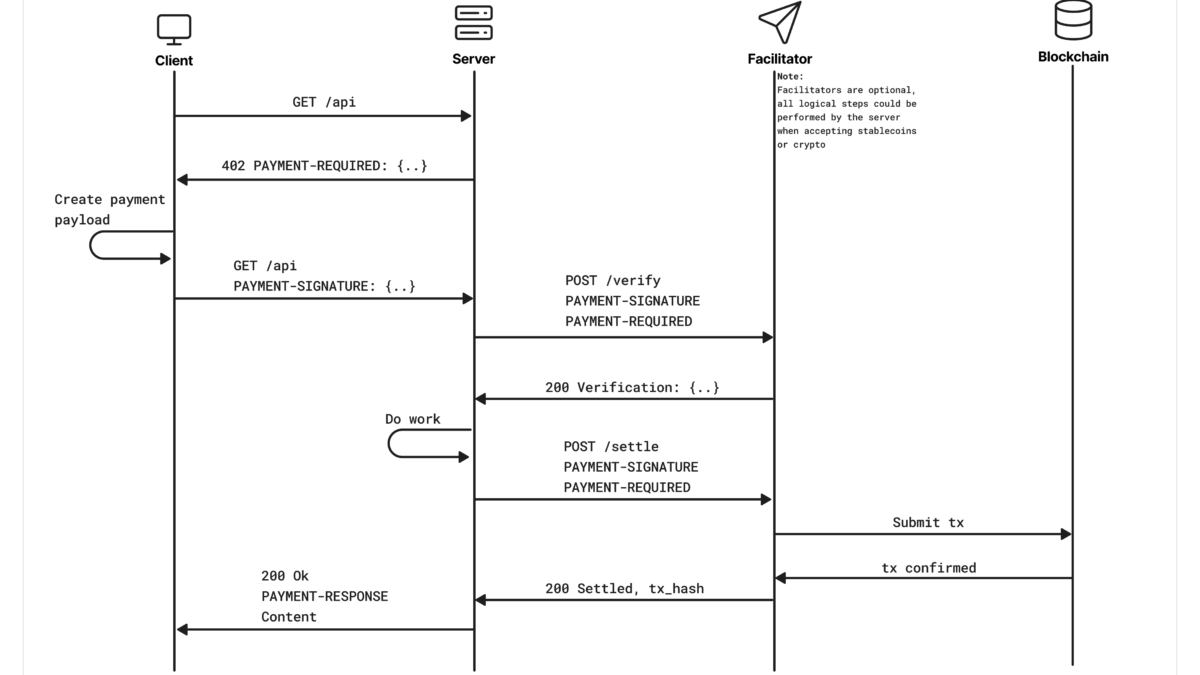
The x402 v2 flow the policy governs runs as a challenge-and-replay: the merchant returns a 402 with a signed price, the plugin validates network, asset, recipient, and amount against your policy, then replays the request with the authorization. x402 is an open payments standard built directly on HTTP, designed to work across crypto and fiat networks without forcing reliance on a single party x402 on GitHub.

Source: GitHub — coinbase/x402: A payments protocol for the internet. Built on HTTP.
Set returnBody to true only when the agent needs the paid content, because publisher responses can carry prompt-injection instructions. The plugin caps the body at 10 KiB and marks it untrusted: true without returning the signed payment proof to the model. For metadata-only fetches, leave returnBody unset or false.
Verify every address in allowedRecipients out of band from merchant documentation, never just because it appeared in a 402 response. This check matters because a 402 challenge is attacker-controlled; trusting its suggested recipient would let a merchant page redirect spend to a wallet you never approved. allowAnyRecipient: true trades recipient allowlisting for flexibility, but origin, network, asset, per-payment, and budget controls still apply. Restart the gateway after saving ~/.openclaw/openclaw.json.
Watch the agent pay for its first URL
Ask your OpenClaw agent to confirm the session is usable:
What's the status of my payment session?
If the session is unavailable, expired, or exhausted, stop and use the trusted administrative path to review or replace it. The model-facing runtime cannot create or extend its own budget. Then ask it to fetch a known test endpoint, such as the Base Sepolia x402 v2 sandbox.
The plugin first performs a bounded network probe and receives the 402 challenge, then verifies the challenge resource shares the origin and path of the requested URL before it validates the network, asset, recipient, and amount against your policy AWS Machine Learning walkthrough. It waits until the signed authorization’s validAfter time, then replays the original request with the payment signature. With returnBody enabled, the tool returns the paid body, caps it at 10 KiB, and marks it untrusted: true. The demo settles a test payment of 0.001 USDC on Base Sepolia.
That single settled charge is the proof the loop works: the agent requested a URL, the plugin quoted the price, and the signed USDC transfer cleared inside the session budget you provisioned. From there the agent can use the returned content exactly as it would use any other tool result.
The figure below shows the experience from the operator’s side: a chat with an OpenClaw gateway assistant that executes a test USDC payment for a paid weather API after the policy clears it.

Source: AWS Machine Learning — Build OpenClaw agents that transact with Amazon Bedrock AgentCore payments
For a retry of the same request, the plugin reuses one idempotency token rather than minting a second payment; avoid issuing the same payment concurrently, since duplicate requests can still race. The plugin never returns the signed payment proof to the model, so a compromised merchant page cannot harvest it.
Keep the model away from the money
The design does not pretend to stop prompt injection. It assumes untrusted input can steer the model and instead bounds what the runtime may do. The wallet secret stays inside AgentCore Identity, the runtime never receives session-write rights, and each transfer is gated by recipient, asset, network, amount, and budget before it can execute.
x402’s trust-minimizing rule backs this up: no facilitator or resource server may move funds except in line with the client’s intent, so a hostile merchant page cannot redirect the authorization x402 on GitHub. Your policy is the last line of defense, and it runs outside the model.
Adjacent AgentCore patterns are documented elsewhere on the site — see the n8n AgentCore agent walkthrough Run production AI agents in n8n with Amazon Bedrock AgentCore and the FinOps agent walkthrough on Bedrock nOps ships FinOps agents on Amazon Bedrock.
What to watch as agentic payments spread
The bounded-wallet pattern is what keeps the capability useful instead of dangerous. As agentic payments move from sandbox builds into live traffic, the policy you pin decides which toll booths your agent may actually pay — and which it cannot.