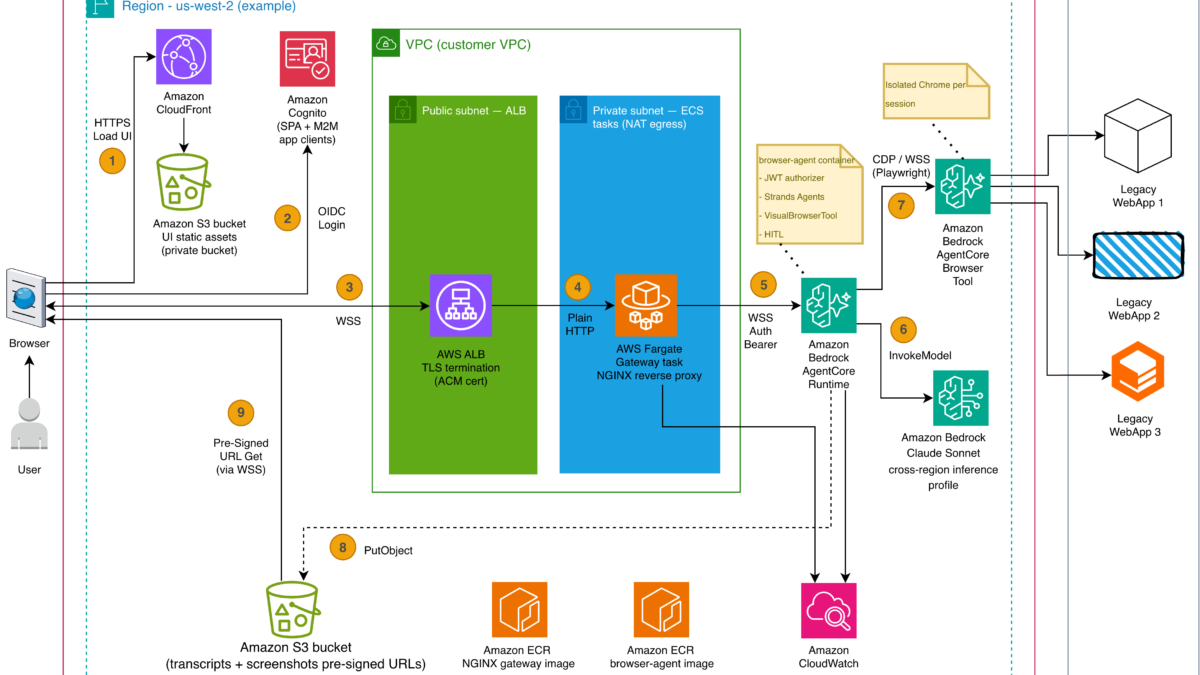
Image: AWS Machine Learning — AgentCore Browser Tool reference architecture for legacy web automation
[IMAGE: agentcore-browser-architecture]
Legacy back-office systems still carry critical workloads for many enterprises, yet most of them expose only HTML rendered by server-side middleware instead of modern APIs AWS Machine Learning blog on automating legacy web applications with Amazon Bedrock AgentCore Browser Tool. When an application has no REST interface, the only way to move data through it is by clicking through the screens a human would use. That gap is exactly where traditional Robotic Process Automation (RPA) breaks down.
RPA scripts are rules-based: they locate buttons by position, type into fields, and hope the page does not change. In practice, minor UI updates, dynamic validation, or an unexpected confirmation dialog derail them, which is why production deployments end up with a long tail of manual interventions that rules-based bots cannot handle. The reference architecture from AWS shows how to replace that fragility with an agent that actually looks at the screen and reasons about what to do next, rather than replaying a fixed script AWS Machine Learning blog on automating legacy web applications with Amazon Bedrock AgentCore Browser Tool.
This guide walks through building an AI “digital worker” that drives a legacy web application through a fully managed cloud browser, using Amazon Bedrock AgentCore Browser Tool for the browser environment and Strands Agents for the decision loop. You will see how the agent keeps an audit trail, defers to a human when its confidence drops, and scales across isolated sessions. The complete reference implementation is published as an AWS sample on GitHub aws-samples/sample-agentcore-browser-legacy-automation, and its README states plainly that the project is a teaching reference meant to be read, deployed to a personal account, and adapted, not production-hardened sample README on GitHub.
What you need before you start
| Requirement | Details | Where to get |
|---|---|---|
| AWS account | Active account with Amazon Bedrock access and AgentCore enabled | AWS Console |
| IAM permissions | Identity with Bedrock AgentCore runtime and browser-tool access | AWS IAM |
| Container registry | Amazon ECR to host the gateway and browser-agent images | Amazon ECR |
| Terraform | To deploy the reference architecture | Terraform |
| Vision-capable model | A multimodal foundation model on Bedrock for screenshot reasoning | Amazon Bedrock |
The target legacy application only needs to be reachable over HTTP or HTTPS; it does not need to be rewritten or re-platformed AWS Machine Learning blog on automating legacy web applications with Amazon Bedrock AgentCore Browser Tool. The browser tool runs a managed Chromium instance in the cloud and reaches the legacy app on the customer’s network, regardless of which browser the app was originally designed for.
How the pieces fit together
The reference architecture pairs a thin front end with a managed browser microVM. A React single-page app on Amazon CloudFront gives an operator a chat interface; Amazon Cognito signs that operator in and issues the JWT that flows through the stack AWS Machine Learning blog on automating legacy web applications with Amazon Bedrock AgentCore Browser Tool. A WebSocket connection crosses an Application Load Balancer that terminates TLS, then an NGINX reverse proxy on AWS Fargate injects the JWT before handing off to Amazon Bedrock AgentCore runtime, where a Strands Agents worker drives the browser.
The managed browser itself is the key component. Amazon Bedrock AgentCore Browser Tool provides a fully managed, cloud-based browser service where each session runs in a dedicated, isolated environment with its own CPU, memory, and filesystem, and when a session completes the environment is terminated and its state sanitized AWS Machine Learning blog on automating legacy web applications with Amazon Bedrock AgentCore Browser Tool. Agents connect through Playwright over a WebSocket-based Chrome DevTools Protocol (CDP) connection, which means they can interact with JavaScript-heavy interfaces, dynamic forms, and multi-step workflows regardless of the underlying technology stack.
Step 1: Provision an isolated browser session
Start by creating a Browser Tool session for the legacy application. Because every session is isolated, you can run many concurrent automations without them sharing cookies, tokens, or local state. The browser agent container initializes a browser microVM and opens a connection to the target over CDP sample README on GitHub.
One practical detail the sample calls out: a TLS-terminating WebSocket proxy is required to solve a specific browser limitation, injecting the user’s OIDC access token onto the WebSocket upgrade so AgentCore runtime can validate it through its JWT authorizer sample README on GitHub. Without that proxy, the browser microVM cannot authenticate the operator’s session.

Image: AWS Machine Learning — initializing the managed browser microVM and injecting the OIDC token
[IMAGE: browser-session-init]
Step 2: Wire the vision reasoning loop
The agent’s core advantage over RPA is that it sees the page. A vision-capable foundation model on Amazon Bedrock, accessed through cross-region inference, receives a screenshot of the browser’s current state and decides the next action — a click, a fill, a scroll, or a pause for human confirmation AWS Machine Learning blog on automating legacy web applications with Amazon Bedrock AgentCore Browser Tool. Strands Agents turns that decision into a concrete tool call through a ReAct (Reason + Act) loop: capture a screenshot, analyze it visually, choose a tool, execute it, observe the result, and repeat AWS Machine Learning blog on automating legacy web applications with Amazon Bedrock AgentCore Browser Tool.
Unlike a fixed RPA script, when a confirmation dialog appears unexpectedly or a field validates differently than anticipated, the model reasons through the new state rather than failing. That adaptability is what makes enterprise-scale automation practical where rules-based bots cannot survive minor UI changes AWS Machine Learning blog on automating legacy web applications with Amazon Bedrock AgentCore Browser Tool.
Step 3: Persist authentication across sessions
Legacy applications frequently sit behind multi-factor authentication (MFA), proprietary single sign-on (SSO), or session tokens with unpredictable expiration — exactly the conditions that force rules-based bots into a long tail of manual interventions AWS Machine Learning blog on automating legacy web applications with Amazon Bedrock AgentCore Browser Tool. The Browser Tool solves this with browser profiles that persist authentication state across sessions: authenticate once, or have a human operator perform the initial login through live view, and subsequent sessions resume already signed in, removing repeated SSO and MFA prompts.
For applications behind corporate networks or IP-allowlisted portals, the proxy configuration routes traffic through corporate proxy infrastructure with domain-based routing and credentials stored in AWS Secrets Manager AWS Machine Learning blog on automating legacy web applications with Amazon Bedrock AgentCore Browser Tool. That makes internal legacy systems reachable without embedding secrets in the agent code.
Step 4: Add human-in-the-loop gating
Brittleness is not the only risk; an autonomous agent performing financial or healthcare changes needs a confidence brake. The reference implementation pauses mid-automation to ask the operator for a decision when model confidence is low, for example confirming a high-value policy modification before submission sample README on GitHub. This human-in-the-loop handler keeps a person in control of consequential steps while letting the agent handle the routine navigation.
The same pattern appears in other Bedrock agent controls: AWS has shipped AgentCore features such as temporal policies and rate limits that constrain how and how often an agent acts, which complements the in-workflow confidence gate described here zBrandCo coverage of Amazon Bedrock AgentCore temporal policies and rate limits.
Step 5: Capture an immutable audit trail
Regulated industries require audit trails that capture user identity, timestamps, data modifications, and system interactions for rules such as GDPR, HIPAA, and financial regulations AWS Machine Learning blog on automating legacy web applications with Amazon Bedrock AgentCore Browser Tool. Financial regulations in particular mandate tamper-proof record retention for six years with immediate accessibility for the most recent 90 days, a logging bar most RPA systems cannot clear without extensive custom development.
The Browser Tool meets this by recording browser interactions — clicks, form inputs, and page navigation — and storing them in Amazon S3, combined with AWS CloudTrail logging to satisfy the audit requirements of financial regulations AWS Machine Learning blog on automating legacy web applications with Amazon Bedrock AgentCore Browser Tool. Each policy modification becomes traceable: who initiated it, what changed, when, and whether it was approved. Screenshots themselves never travel inline over the WebSocket; the agent saves the PNG bytes to S3 and forwards a short-lived pre-signed URL that the UI renders directly sample README on GitHub.

Image: AWS Machine Learning — streaming pre-signed screenshot URLs and reasoning traces to the operator UI
[IMAGE: chat-ui-screenshot-stream]
Step 6: Deploy the reference architecture
The sample ships with Terraform that deploys the whole stack on a personal AWS account, including the CloudFront-hosted React UI, the Fargate NGINX proxy, the AgentCore runtime worker, and the browser microVM sample README on GitHub. It also includes sensible defaults — edge JWT auth, admin-create-only Cognito, CloudFront security headers, digest-pinned images, and LOG_LEVEL=ERROR — but the README is explicit that several hardening steps are intentionally left to you before any production or internet-facing use sample README on GitHub.
Session state and screenshots land in Amazon S3 by default, with Amazon DynamoDB offered as a drop-in alternative for session storage; Amazon CloudWatch provides audit logging and observability across the deployment sample README on GitHub. Run the integration test suite locally first — Amazon Cognito issues the machine-to-machine tokens the tests use — before pointing the worker at a live legacy system.
Why this beats screen-scraping RPA at scale
Traditional UI-based automation builds brittle dependencies on screen layouts, element positioning, and application timing that break with minor updates, and it cannot handle exceptions or cognitive decisions required for complex business processes AWS Machine Learning blog on automating legacy web applications with Amazon Bedrock AgentCore Browser Tool. The agent model removes those dependencies: the foundation model interprets the rendered page, so a layout tweak no longer means a rewrite. For an insurer processing tens of thousands of plan changes annually, the difference is the gap between a bot that needs constant rescue and one that recovers intelligently when a page renders in an unexpected state.
If your broader Bedrock strategy also needs live, cited answers from the open web, that same agent stack can be extended with server-side web grounding, which keeps responses anchored to current sources without a separate search vendor zBrandCo guide to enabling web search grounding on Amazon Bedrock.
Takeaways
You now have a concrete path to replace brittle RPA on a legacy web application: provision an isolated managed browser session, drive it with a vision-reasoning Strands Agent loop, persist auth through browser profiles, gate risky steps behind a human, and record every interaction to S3 and CloudTrail. The full code is a reference sample on GitHub aws-samples/sample-agentcore-browser-legacy-automation, so you can deploy it to a personal account, observe the chat-driven flow, and adapt it to your own legacy system. Treat it as a teaching blueprint, not a turnkey product, and add your own hardening before any production use.