

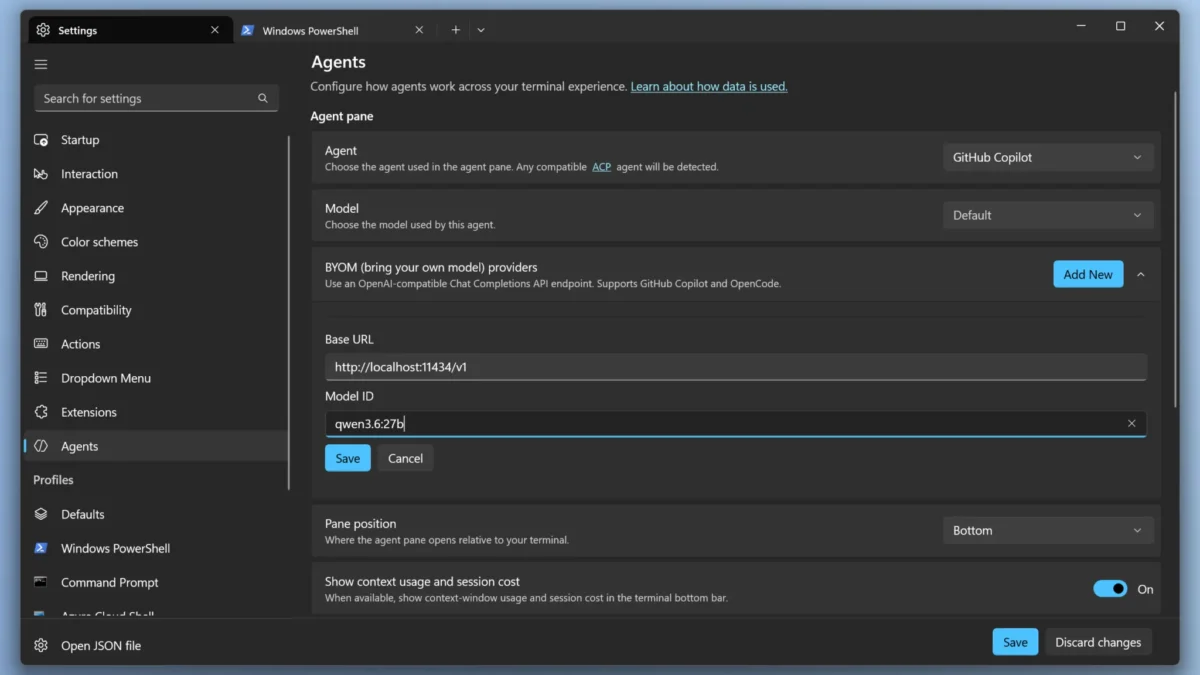
Microsoft shipped the first minor update to its open-source Intelligent Terminal, and the headline feature is the ability to keep AI agent work entirely on your own hardware. The 0.2 release, versioned v0.2.2192 on the project’s GitHub releases page, adds “bring your own model” (BYOM) support to the Agent Pane so a model served by Ollama or any OpenAI-compatible endpoint can power agent workflows without leaving the machine (Windows Command Line). For developers wary of sending code and logs to the cloud, the change turns private, offline agent runs into a settings toggle instead of a workaround.
The local-model option lives inside the agent settings, where you add a provider by supplying a base URL and model ID, then pick it from the model dropdown (Windows Command Line). It works with both GitHub Copilot and OpenCode backends, so the same local endpoint can drive either agent. The full set of closed issues and feature requests behind the release is tracked on the project’s GitHub issues page (microsoft/intelligent-terminal).
Beyond local models, 0.2 leans into running a different agent for each task. The new /agent slash command lets every tab host its own agent — Copilot in one, Claude in another, Codex in a third — with conversations isolated so switching tabs never disturbs the others (Windows Command Line). OpenCode is now a first-class Agent Pane backend, and both the Agent Pane agent and the ?
The Agent Pane itself is easier to read: mouse selection and Unicode-safe copy, up to 50 recent prompts per tab, animated tool-call states that show the exact paths and commands an agent touches, and an optional status bar that surfaces token usage and cost as you work. Pasting an image with Alt+V sends it straight to the agent as an image block, useful for error screenshots or UI mockups. Autofix also learned to recognize real-world failures such as PowerShell 5.1 runtime errors, parser errors, and command-not-found cases (Windows Command Line).
You can install the update from the Microsoft Store, via winget install Microsoft.IntelligentTerminal, or from the GitHub release page. The 0.1 release that started this line is covered in our earlier walkthrough of Microsoft Intelligent Terminal 0.1. Microsoft says terminal session restore — saving and resuming whole shell sessions — is the next major item on the roadmap.
Editorial note: Citation cleanup: we trimmed duplicate citation links that repeated the same source after multiple paragraphs. Every fact and quote is unchanged; the source remains cited where each claim appears.



