

Every time you type a web address, tap a link, or open an app, a tiny negotiation happens before a single byte of the page arrives: your device has to convert a human-friendly name like example.com into a machine-usable IP address such as 93.184.215.14. The system that does this — the Domain Name System, or DNS — is one of the oldest pieces of internet infrastructure still running essentially as designed. The core specification, RFC 1035, was published by Paul Mockapetris back in November 1987, and yet the same architecture now fields trillions of lookups a day, absorbed a DDoS attack against multiple root servers in December 2025, and barely flinched.
That resilience is not an accident. It comes from three design decisions — hierarchy, delegation, and aggressive caching — that are worth understanding whether you are debugging a site that “won’t load,” setting up a home lab, or just curious why the internet’s address book almost never goes down.
A lookup is a chain of four questions
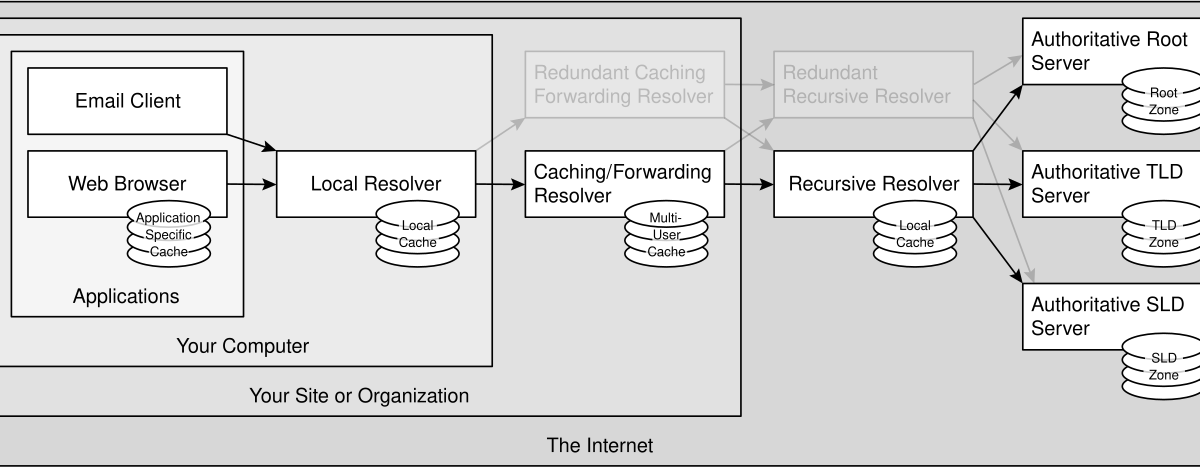
DNS is often described as a phone book, but the mechanics are closer to asking directions in a strange city. When your browser needs the address for www.example.com, your device does not know the answer and does not try to find it alone. It asks a recursive resolver — typically run by your ISP, or a public one like 1.1.1.1 or 8.8.8.8 — to do the legwork.
If the resolver has never seen the name before, it works down the hierarchy:
- The root. The resolver asks a root name server, “who handles
.com?” The root does not know wherewww.example.comlives; it only knows who is responsible for each top-level domain, and it answers with a referral. - The TLD servers. The
.comregistry’s name servers answer the next question: “who is authoritative forexample.com?” Another referral. - The authoritative server. The name servers that actually host
example.com‘s zone answer the final question with the record itself: the IP address forwww. - The answer comes home. The resolver hands the IP back to your device, and the browser opens a connection to it.
The crucial detail is that no single machine holds the whole map. Each layer only knows how to delegate to the next one down. That is what lets the system scale to hundreds of millions of domains: adding a new domain changes nothing at the root or TLD layer except one small delegation record.
The root: 13 names, 12 operators, and more than 2,000 servers
The top of the hierarchy sounds fragile on paper — there are only 13 root server identities, lettered A through M. In practice, it is one of the most redundant systems ever deployed. According to root-servers.org, the root server system as of July 24, 2026 consists of 2,001 operational server instances run by 12 independent organizations, including Verisign, ICANN, NASA, the U.S. Army Research Lab, Sweden’s Netnod, Japan’s WIDE project, and the RIPE NCC.
The trick that turns 13 names into 2,001 servers is anycast routing: every instance of, say, the K-root announces the same IP address, and the internet’s routing system automatically delivers your query to the nearest healthy one. Knock out an instance — or a whole city’s worth — and traffic silently reroutes. This is why the December 2025 DDoS against multiple root letters, and even a route hijack of root server address prefixes in June 2025, never translated into an internet outage that users could feel. The full list of the 13 identities and their operators is published by IANA, which coordinates the root zone itself.
There is a subtle point worth internalizing: the root servers are not “the internet’s master switch.” They answer a tiny, boring question — who runs each TLD — and they answer it identically everywhere. The actual records for your domain live much further down, on authoritative servers you or your DNS provider control.
Records: the rows in the address book
What the authoritative server returns depends on the record type requested. A handful cover almost everything you will encounter:
- A / AAAA — the workhorses: map a name to an IPv4 (A) or IPv6 (AAAA) address.
- CNAME — an alias that says “this name is really that name,” commonly pointing
www.example.comat a CDN hostname. - MX — where email for the domain should be delivered.
- TXT — free-form text, now mostly used for verification and email security policies like SPF and DKIM.
- NS — the delegation glue: which name servers are authoritative for a zone.
Each record carries a TTL (time to live), a number of seconds that answers one question: how long may a resolver cache this answer before asking again? TTLs are the quiet lever behind both DNS’s speed and its most confusing failure mode. Set a TTL of 86,400 (one day) and the world’s resolvers will keep serving your old IP for up to a day after you change it — the classic “DNS propagation” wait, which is not propagation at all, just caches politely expiring on schedule. Set it to 60 and changes land fast, at the cost of more queries hitting your authoritative servers.
Caching is why the whole thing feels instant
The four-step chain above sounds slow, and it would be if it ran every time. It almost never does. Your operating system caches answers. Your router may cache answers. Your recursive resolver definitely caches answers, shared across every customer who uses it. By the time you visit a popular site, the odds that any part of the chain needs to be walked from the root are tiny — most lookups are answered from a cache in a millisecond or two.
This caching pyramid also explains a debugging rule of thumb: when a site loads on your phone (on mobile data) but not your laptop (on Wi-Fi), suspect a stale cache or a misbehaving resolver on the Wi-Fi path before you suspect the site. Swapping your device’s resolver to a public one is the standard first experiment precisely because it swaps out an entire layer of cache.
Trust and privacy: DNSSEC, DoH, and DoT
Classic DNS has two well-known weaknesses: answers are not authenticated, and queries travel in plain text. Two separate fixes address them, and they are frequently confused.
DNSSEC tackles authenticity. Zone operators cryptographically sign their records, and validating resolvers check the signature chain all the way from the root down. A forged answer fails validation and gets discarded. The catch is operational: DNSSEC keys must be rotated (“rolled”) carefully, and a botched rollover takes a zone offline for everyone behind a validating resolver — a failure mode that has bitten entire country-code TLDs.
DNS over HTTPS (DoH) and DNS over TLS (DoT) tackle privacy. They encrypt the conversation between your device and the recursive resolver, so networks in between cannot read or tamper with your lookups in transit. They do not, by themselves, verify that the answer is authentic — that is still DNSSEC’s job. The two are complements, not competitors.
Why DNS suddenly matters again in 2026
For two decades, DNS was plumbing you could ignore. Two shifts are pulling it back into view. First, the resolver has become a policy point: modern zero-trust products evaluate every query against security rules, blocking malware domains at lookup time before a connection is ever attempted. Second, the wall between public and private naming is dissolving — Cloudflare’s Internal DNS, which went GA this month, runs corporate-internal zones on the same resolver infrastructure that answers public queries, so printer.corp.internal and example.com resolve through one pipe with one audit trail.
Both trends point the same direction: the humble name lookup is becoming the first checkpoint of every connection, which makes understanding it less like trivia and more like table stakes.
The takeaway
DNS endures because it refuses to centralize: the root delegates to TLDs, TLDs delegate to your name servers, and caches absorb the load in between. When it “breaks,” the cause is almost always human — a stale cache, an expired domain, a fat-fingered record, a rushed DNSSEC rollover — rather than the architecture itself. Next time a site will not load, remember the chain: local cache, resolver, root, TLD, authoritative. Somewhere along those five hops is your answer, and now you know which questions each hop is actually being asked.



