Amazon Bedrock AgentCore gateway now supports rate limiting, giving operators fine-grained control over how much traffic individual users and groups can send through a single AI entry point. The feature applies to MCP servers, inference targets, HTTP passthrough endpoints, and the agents or tools those targets expose. Rate limits are evaluated in two layers—customer-defined rules first, then AWS service quotas—so organizations can enforce fair-usage policies without managing custom infrastructure. This matters because agentic workloads often combine long-running streaming inference, tool calls, and A2A traffic in ways that traditional API gateways do not anticipate. Without rate limiting, a single user or misconfigured agent can monopolize backend capacity and degrade experience for everyone else sharing the same gateway. AWS also supports three target types—MCP targets, inference targets, and HTTP passthrough targets—each of which can receive different rate limit treatments depending on workload profile. For teams already using AgentCore gateway to route traffic across multiple model providers or expose internal tools as MCP servers, the new controls add a production-grade throttling layer without requiring a separate API management product.
The gateway supports three metric types. Requests per second and requests per minute (RPS/RPM) apply to all target types and count every incoming request as exactly one unit toward the configured limit, regardless of whether the request finishes in milliseconds or streams for minutes, according to the AWS announcement on AgentCore gateway rate limiting. Token rate limits, measured in tokens per minute (TPM), apply only to inference targets and account for both input and output tokens. The gateway deducts an estimated input token count upfront using a general-purpose tokenizer, then reconciles the actual usage once the model provider returns its response. Connection rate limits, measured in connections per second (CPS), apply to all target types and track how long each request holds an open connection. A streaming inference call that runs for 100 seconds consumes one connection slot for the entire duration, which makes CPS the right metric when you need to cap simultaneous sessions rather than arrival rate.
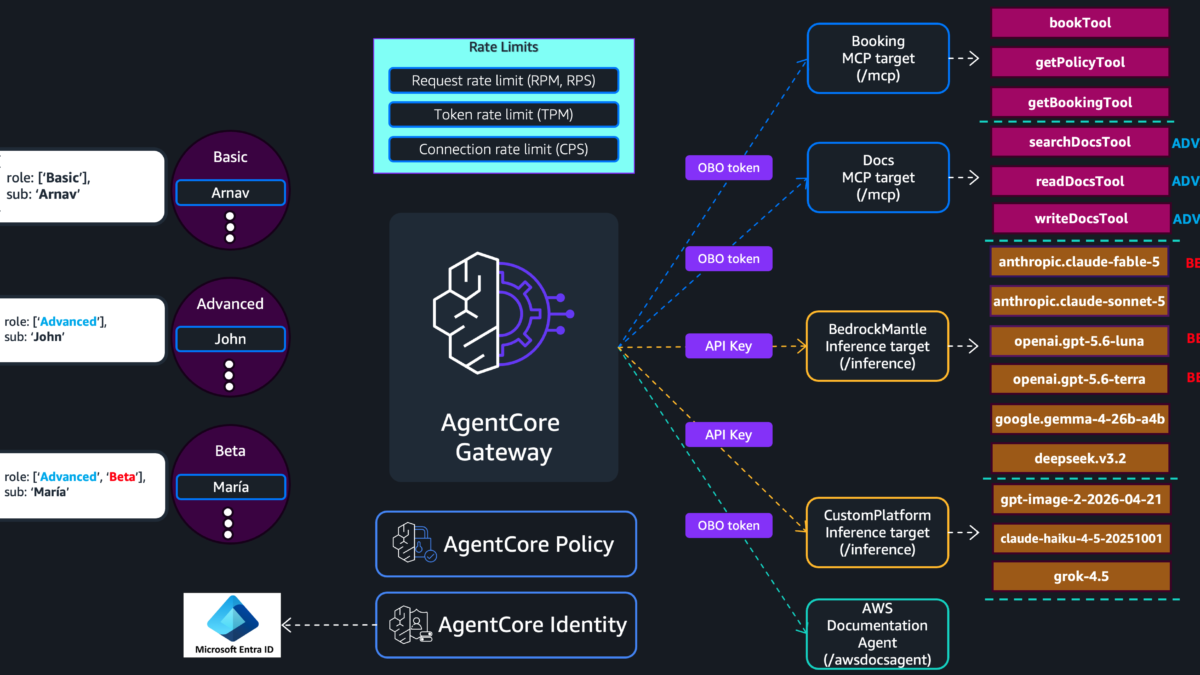
Operators define rules using dimension keys that bucket traffic by attributes such as target name, model ID, tool name, JWT role claims, IAM principals, or source identity, according to the official AWS blog on AgentCore gateway rate limiting. An entry pairs those keys with allowed throughput. The gateway evaluates named entries before falling back to wildcard rules, so the most specific match always wins. For example, a Booking MCP target can receive 100 RPS while every other target defaults to 10 RPS, with each remaining target getting its own independent bucket. Supported dimension keys include targetName, toolName, qualifiedModelId, $.context.jwt.<claim>, $.context.iam.principal, and $.context.iam.sourceIdentity. You can combine multiple dimension keys for finer control—for instance, grouping by both target name and JWT role claim gives each user group its own independent rate bucket per target.
A common production pattern is a two-layer enforcement model. The first layer scopes limits by user group—Basic, Advanced, or Beta—using JWT role claims. The second layer adds a per-user ceiling by including the JWT subject claim alongside the role. Both rules use AND semantics, so a request must pass the group limit and the individual limit to proceed. This prevents one user from starving peers within the same tier while still protecting backend targets from traffic spikes. The AWS blog illustrates this with an example in which Basic users receive 100 RPM and 50 CPS at the group level, while Advanced users receive 300 RPM and 150 CPS. Within the Advanced tier, each individual user is capped at 60 RPM and 30 CPS, so a single power user cannot exhaust the group budget. If one Basic user sends 100 requests in a minute, the gateway denies the overflow at the per-user limit even if the group total has not yet reached 100 RPM. Conversely, if the entire Basic group has collectively consumed 100 RPM, all Basic users are throttled regardless of individual consumption. The Amazon Bedrock AgentCore documentation confirms that Gateway routes and secures agentic traffic through one endpoint, converting APIs, Lambda functions, and existing services into Model Context Protocol-compatible tools.
Target-level limits add a third safeguard for high-traffic downstream resources. Using targetName, qualifiedModelId, or toolName as the dimension key, operators can protect specific models, MCP servers, or tools from monopolization. Token limits on a single target are especially useful when a restricted model is expected to attract heavy benchmarking traffic, because they prevent that subset of users from consuming capacity shared by everyone else on the same endpoint. The AWS blog notes that customer-defined limits cannot exceed service-managed quotas, and the effective rate is always the minimum of the two. Some quota increases are available through the Service Quotas console. Rate limit configurations are created with the AWS CLI using bedrock-agentcore-control create-gateway-rate-limit, and they take effect without redeploying the gateway.
If you are already routing agent traffic through AgentCore gateway, rate limiting removes the need to build custom throttling logic in front of MCP servers, inference endpoints, or agent workflows. The feature works alongside existing identity and access policies, so you do not need to replace your current JWT or IAM setup. For teams evaluating the service, it is one more signal that AWS is treating the gateway as a production routing layer rather than a simple MCP proxy. The Supported targets for Amazon Bedrock AgentCore gateways documentation describes how MCP targets operate in aggregation mode while HTTP targets pass traffic through without protocol translation, which affects how you dimension your rate limits for each target class.
Here is how to configure rate limits for AgentCore gateway using the AWS CLI.
Step 1: Review your gateway targets and traffic patterns
Before creating any rate limit, list the targets attached to your gateway and identify which ones handle inference, MCP aggregation, or HTTP passthrough. Each target type supports different metric combinations: inference targets accept RPS, RPM, TPM, and CPS; MCP and HTTP targets accept RPS, RPM, and CPS but not TPM. If you are routing multiple model providers through a single inference target, token limits become especially important because streaming responses vary widely in token count. The Amazon Bedrock AgentCore Gateway documentation explains that Gateway provides both comprehensive ingress authentication and egress authentication in a fully managed service, which means your rate limit rules can safely rely on JWT claims and IAM principals without losing visibility into caller identity. You can find similar production routing patterns discussed in the zBrandco article Run production AI agents in n8n with Amazon Bedrock AgentCore, which covers how teams connect AgentCore gateway to workflow automation tools.
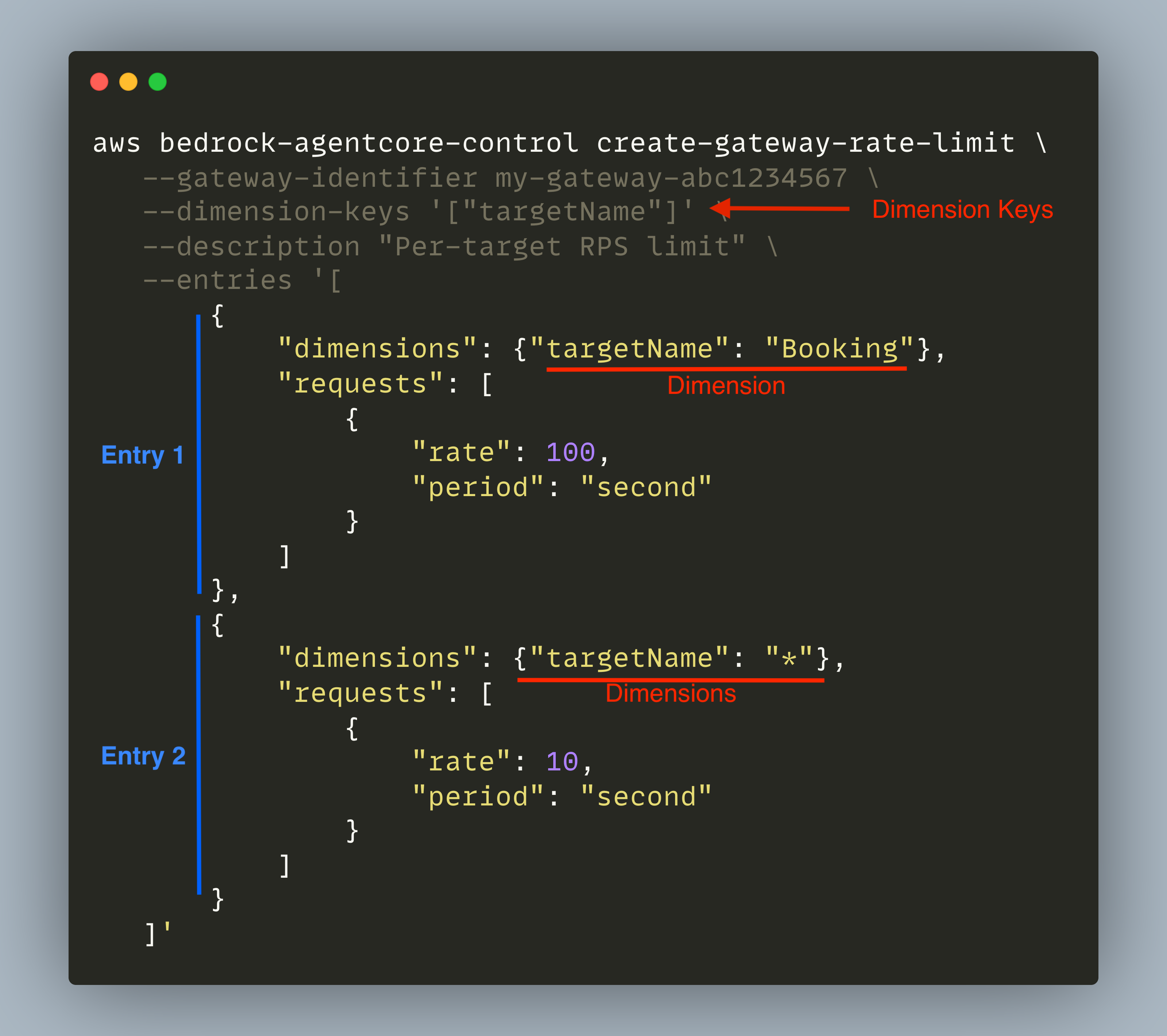
Image: Rate limit structure with dimension keys and entries showing how named entries take precedence over wildcard rules. Source: AWS Machine Learning Blog
Step 2: Create a group-level rate limit using JWT role claims
The first layer scopes throughput by user group, as documented in the AWS announcement on AgentCore gateway rate limiting. Use $.context.jwt.role as the dimension key and define an entry for each role. Each entry specifies request and connection limits. Because the JWT role claim is an array, each unique combination requires its own entry. The following example assigns 100 RPM and 50 CPS to Basic users, 300 RPM and 150 CPS to Advanced users, and 80 RPM and 10 CPS to any unmatched role. Named entries take precedence over the wildcard * entry, so a request from an Advanced user matches the Advanced entry before falling back to the catch-all rule. This configuration enforces fair usage at the group level while still allowing higher tiers to burst when backend capacity permits. If your identity provider uses a different claim for role membership, map that claim to the JWT role field before AgentCore gateway evaluates the rate limit.
aws bedrock-agentcore-control create-gateway-rate-limit \
  --gateway-identifier my-gateway-abc1234567 \
  --dimension-keys '["$.context.jwt.role"]' \
  --description "Per-role request and connection limit" \
  --entries '[
    { "dimensions": {"$.context.jwt.role": "[\"Basic\"]"}, "requests": [{"rate": 100, "period": "minute"}], "connections": [{"rate": 50, "period": "second"}] },
    { "dimensions": {"$.context.jwt.role": "[\"Advanced\"]"}, "requests": [{"rate": 300, "period": "minute"}], "connections": [{"rate": 150, "period": "second"}] },
    { "dimensions": {"$.context.jwt.role": "[\"Advanced\", \"Beta\"]"}, "requests": [{"rate": 300, "period": "minute"}], "connections": [{"rate": 200, "period": "second"}] },
    { "dimensions": {"$.context.jwt.role": "*"}, "requests": [{"rate": 80, "period": "minute"}], "connections": [{"rate": 10, "period": "second"}] }
  ]'
Step 3: Add per-user ceilings using JWT subject claims
The second layer prevents any single user from exhausting the group budget. Use $.context.jwt.sub alongside $.context.jwt.role as the dimension key. The subject claim uniquely identifies each user, so every distinct subject receives its own independent bucket within the group ceiling. In this configuration, each Basic user is capped at 20 RPM and 10 CPS, while Advanced users receive 60 RPM and 30 CPS. Even if one Advanced user sends 60 requests in a minute, that consumer cannot affect the quota available to other Advanced users. Both rate limits are evaluated independently with AND semantics, so a request must pass both the group-level limit and the per-user limit to proceed. The AWS blog notes that if Arnav, a Basic user, has consumed 20 RPM individually, his next request is denied by the per-user limit even though the Basic group still has 80 RPM of remaining capacity.
aws bedrock-agentcore-control create-gateway-rate-limit \
  --gateway-identifier my-gateway-abc1234567 \
  --dimension-keys '["$.context.jwt.role", "$.context.jwt.sub"]' \
  --description "Per-user request and connection limit within each role" \
  --entries '[
    { "dimensions": {"$.context.jwt.role": "[\"Basic\"]", "$.context.jwt.sub": "*"}, "requests": [{"rate": 20, "period": "minute"}], "connections": [{"rate": 10, "period": "second"}] },
    { "dimensions": {"$.context.jwt.role": "[\"Advanced\"]", "$.context.jwt.sub": "*"}, "requests": [{"rate": 60, "period": "minute"}], "connections": [{"rate": 30, "period": "second"}] },
    { "dimensions": {"$.context.jwt.role": "[\"Advanced\", \"Beta\"]", "$.context.jwt.sub": "*"}, "requests": [{"rate": 60, "period": "minute"}], "connections": [{"rate": 50, "period": "second"}] },
    { "dimensions": {"$.context.jwt.role": "*", "$.context.jwt.sub": "*"}, "requests": [{"rate": 20, "period": "minute"}], "connections": [{"rate": 20, "period": "second"}] }
  ]'
Step 4: Configure target-level limits for high-traffic downstream resources
The third layer protects specific targets from monopolization. Use targetName as the dimension key to assign different ceilings to individual MCP servers, inference endpoints, or HTTP targets. A named entry for a Booking MCP server might receive 20 RPS, while a Docs target receives 15 RPS and an awsdocsagent target receives 10 RPS plus 60 CPS. The wildcard entry applies a shared ceiling to every target without its own named entry. You can also use qualifiedModelId to set connection rate limits per model, or toolName to set request rate limits per individual tool such as Booking___bookTool or Docs___searchDocsTool. Token limits are particularly useful when a restricted model is expected to attract heavy benchmarking traffic, because they prevent that subset of users from consuming capacity shared by everyone else on the same endpoint. The zBrandco article on AgentCore temporal policies and rate limits provides additional context on how AWS is expanding the gateway’s policy surface beyond simple routing.
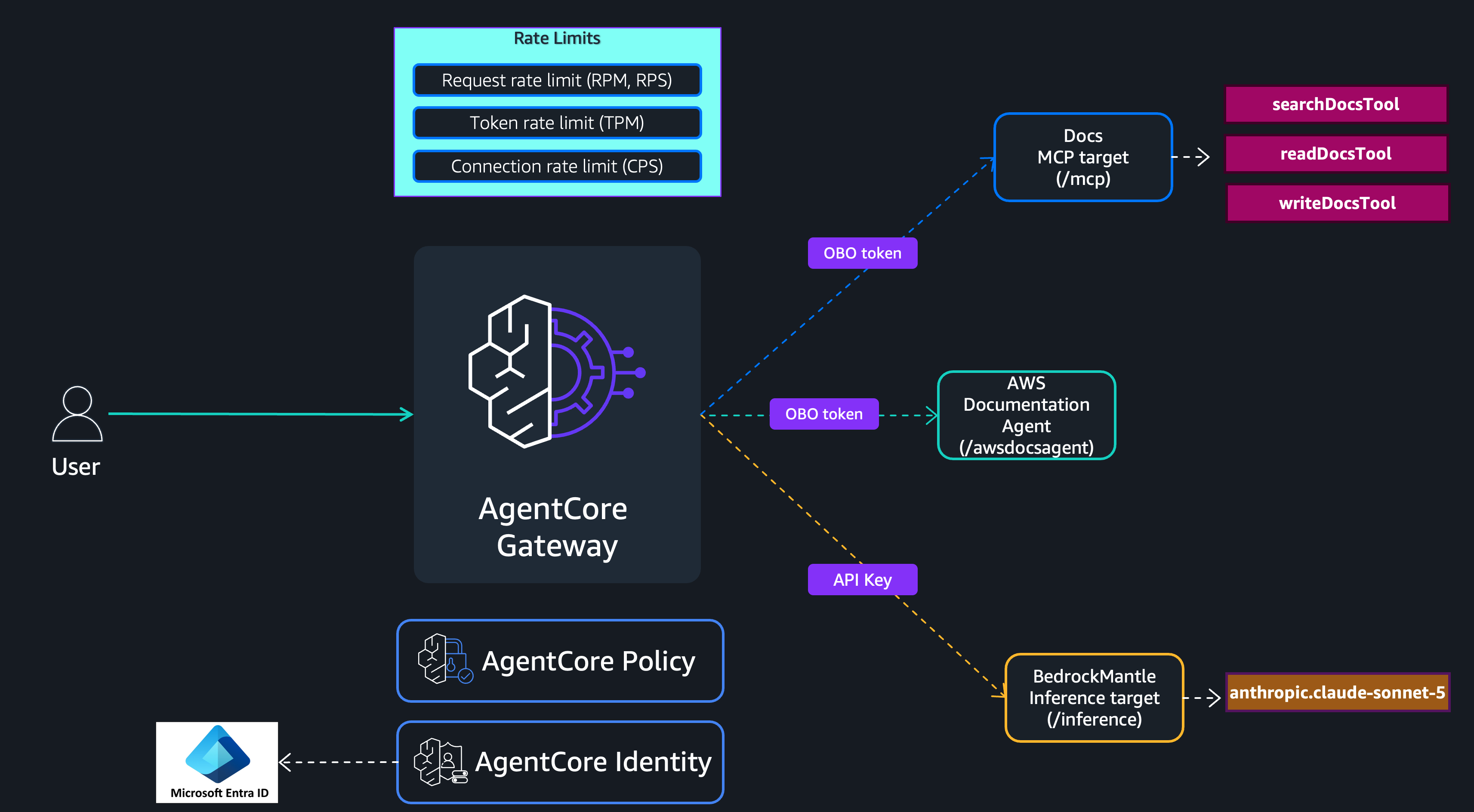
Image: CLI output showing gateway rate limit configuration applied to multiple targets with different request and connection limits. Source: AWS Machine Learning Blog
aws bedrock-agentcore-control create-gateway-rate-limit \
  --gateway-identifier my-gateway-abc1234567 \
  --dimension-keys '["targetName"]' \
  --description "Per-target rate limit" \
  --entries '[
    { "dimensions": {"targetName": "Booking"}, "requests": [{"rate": 20, "period": "second"}] },
    { "dimensions": {"targetName": "Docs"}, "requests": [{"rate": 15, "period": "second"}] },
    { "dimensions": {"targetName": "awsdocsagent"}, "requests": [{"rate": 10, "period": "second"}], "connections": [{"rate": 60, "period": "second"}] },
    { "dimensions": {"targetName": "BedrockMantle"}, "tokens": [{"rate": 100000, "period": "minute"}], "connections": [{"rate": 250, "period": "second"}] },
    { "dimensions": {"targetName": "CustomPlatform"}, "tokens": [{"rate": 50000, "period": "minute"}], "connections": [{"rate": 100, "period": "second"}] },
    { "dimensions": {"targetName": "*"}, "tokens": [{"rate": 10000, "period": "minute"}], "requests": [{"rate": 10, "period": "second"}], "connections": [{"rate": 50, "period": "second"}] }
  ]'
Step 5: Confirm service quotas and effective rates
Customer-defined rate limits cannot exceed service-managed quotas. The effective rate for any request is the minimum of the customer-defined limit and the service-managed limit. Before applying production rules, check the Service Quotas console for your account to see the current ceilings on requests per minute, tokens per minute, and connections per second. If a customer-defined limit exceeds the quota, the gateway enforces the lower quota value. You can request quota increases for some limits through the console, but approval is not automatic and may require a support case. The blog notes that this two-layer evaluation happens for every request, so there is no risk of a customer-defined rule accidentally bypassing the service ceiling.
Step 6: Test throttling behavior and adjust thresholds
After applying rate limits, send test traffic through the gateway from different identities and observe the throttling responses. A request that passes the group-level limit but exceeds the per-user limit returns a throttling response immediately. A request that passes both limits but exceeds a target-level token or connection limit is also denied. Because the gateway evaluates customer-defined limits before service quotas, you will see throttling from your own rules long before hitting the AWS-managed ceiling. Monitor CloudWatch metrics or AgentCore gateway logs to verify that each dimension key resolves to the expected value. If a JWT claim is missing or malformed, the gateway treats it as a non-match, which may cause the request to fall through to the wildcard entry or be denied depending on your configuration. The AWS blog on configuring rate limits for AI traffic on AgentCore gateway provides the full reference for dimension key syntax and entry precedence rules.
Choosing the right dimension key combination
The dimension key you select determines how finely the gateway can isolate traffic. targetName works well when you need to protect specific MCP servers or inference endpoints from overuse. toolName is better when a single target exposes many tools and you want to limit only the expensive ones. $.context.jwt.role or $.context.iam.principal is the right choice for fair-usage policies across user groups, while $.context.jwt.sub adds the per-user granularity needed to prevent one individual from starving peers. Combining targetName with $.context.jwt.role gives each group its own bucket per target, which is the most common production setup for multi-tenant gateways. If your organization uses IAM roles instead of JWT tokens, substitute $.context.iam.principal or $.context.iam.sourceIdentity for the JWT-based claims. The gateway does not support arbitrary request headers as dimension keys, so plan your identity and routing strategy before locking in the dimension key schema.
Editorial note: Citation cleanup: we trimmed duplicate citation links that repeated the same source after multiple paragraphs. Every fact and quote is unchanged; the source remains cited where each claim appears.