If your team runs several AI features on Amazon Bedrock, the default AWS bill shows one lump line for “AmazonBedrock” with no way to tell which application, user, or service burned the tokens. The fix is granular cost attribution: AWS now tags every Bedrock inference call with the IAM principal that made it, and you can surface that data in Amazon Athena and the Cloud Intelligence Dashboards (CUDOS) framework. This guide walks through the concrete setup — from a Cost and Usage Report 2.0 export to working SQL queries and a prebuilt dashboard — so you can answer “who spent what on Bedrock this month?” without guessing. AWS explains the full mechanics in its Bedrock cost-attribution walkthrough with Athena and CUDOS.
Why per-principal attribution matters
A single Bedrock endpoint is often shared by many callers: a CI bot, a customer chatbot, an internal summarizer, and a developer’s local experiment. When the monthly invoice only says “AmazonBedrock — $4,200,” nobody can tell which workload drove it, so chargeback and model-rightsizing stall. The line_item_iam_principal column attaches the caller’s identity to every row of usage, turning an opaque total into a per-user, per-application, and per-project breakdown. The feature was introduced in Part 2: Amazon Bedrock cost attribution with Amazon Athena and CUDOS, which builds on an earlier post that first traced each inference request back to the IAM principal that made the call.
What you’ll need before starting
Gather these before touching the console, because the export and Athena setup each need specific permissions:
- An AWS account with access to the Billing and Cost Management console.
- IAM permissions for Cost and Usage Reports, Amazon S3, and Amazon Athena.
- An S3 bucket that will hold the CUR 2.0 data files.
- Basic comfort with SQL and the AWS Management Console.
- (Optional) Claude Code or Kiro-CLI if you want an AI assistant to run the setup from the sample repo described later.
You do not need to pre-create the Athena database; the CloudFormation deployment step builds it for you. The complete prerequisite list and end-to-end flow appear in the same AWS Machine Learning post on Bedrock cost attribution.
Step 1: Create a CUR 2.0 export with IAM principal data
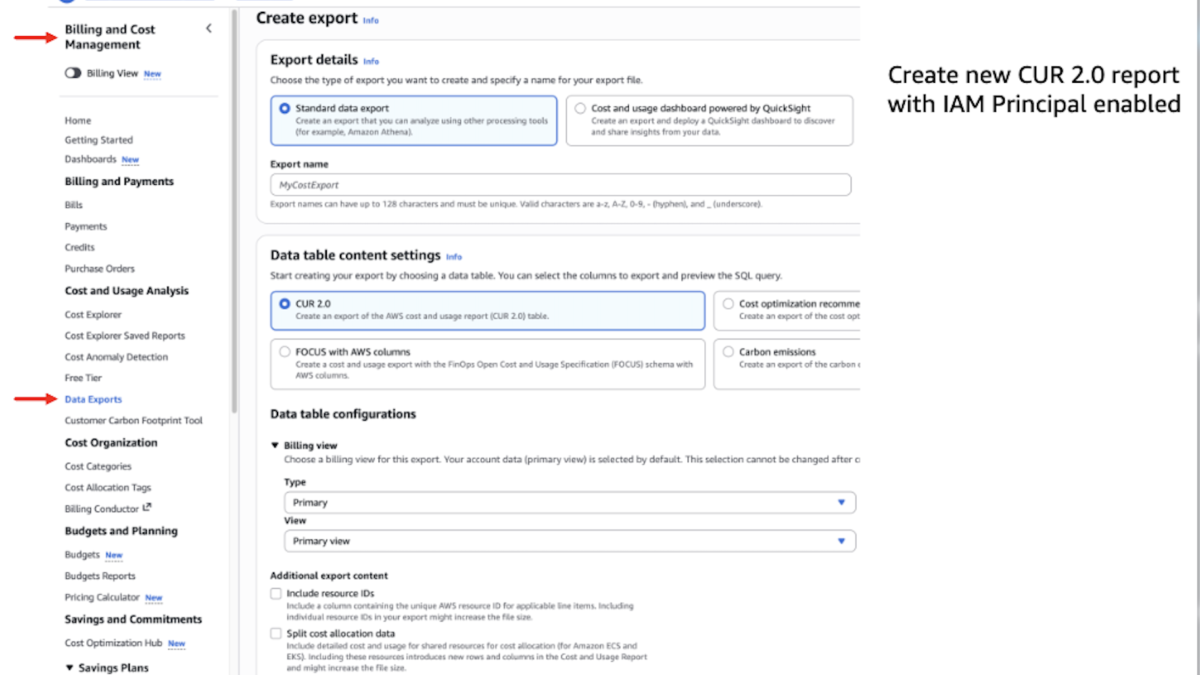
Open the Data Exports page in the Billing console and create a standard CUR 2.0 export following AWS’s Creating data exports instructions. The critical switch is in Additional export content: tick Include caller identity (IAM principal) allocation data. Without this box, the line_item_iam_principal column stays empty and none of the later queries will return per-user rows. The exact configuration steps live in Creating data exports – AWS Data Exports.
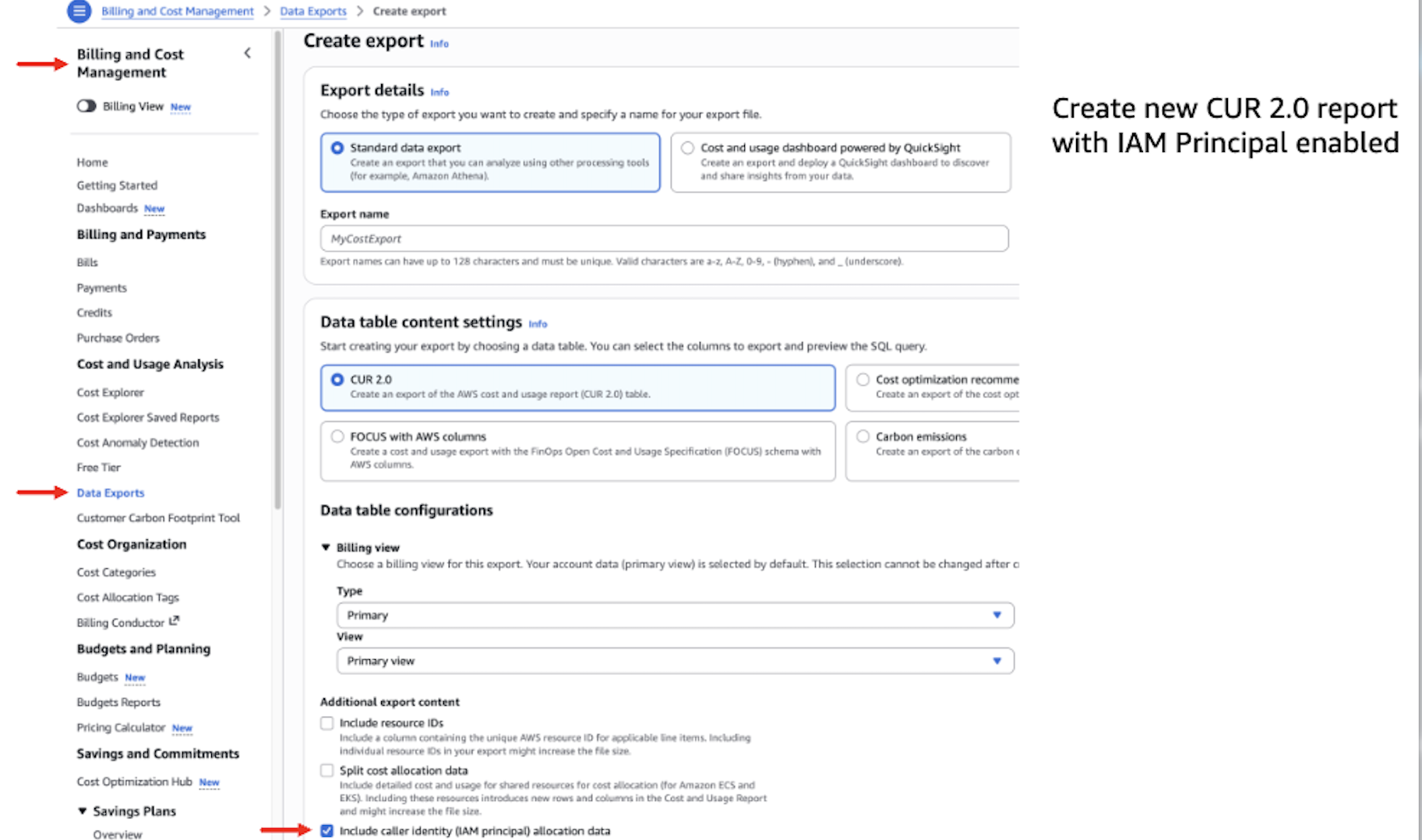
Source: Part 2: Amazon Bedrock cost attribution with Amazon Athena and CUDOS — AWS Machine Learning blog.
In Data table configurations, set time granularity to Hourly for maximum detail. Under Data export delivery options, set file versioning to Overwrite existing report so you do not accumulate duplicate historical files. AWS notes that enabling IAM principal data increases CUR file sizes, because a single usage row is now expanded into one row per IAM principal that contributed to the call — for high-volume workloads with many distinct principals, plan S3 storage accordingly and consider S3 Lifecycle policies for older CUR files (Amazon Bedrock cost attribution walkthrough).
Expect a wait: AWS states it can take up to 24 hours to deliver your first CUR 2.0 report to the S3 bucket (Amazon Bedrock cost attribution walkthrough).
Step 2: Connect CUR 2.0 to Amazon Athena
With the export landing in S3, point Athena at it using standard SQL and no servers to manage. The fastest path is the open sample repo aws-samples/sample-cur-iam-principal-bedrock-tracking, which ships an agent.md that walks an AI coding agent (Claude Code, Kiro-CLI, or Codex) through the whole connection:
git clone https://github.com/aws-samples/sample-cur-iam-principal-bedrock-tracking
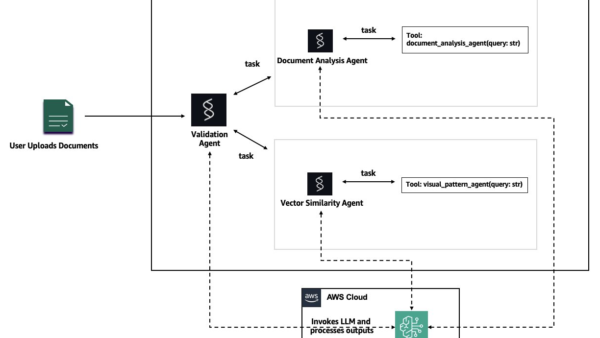
Then launch claude or kiro in that directory and prompt: “Read agent.md and follow its workflow to set up Cost and Usage Report tracking and run the Amazon Bedrock-by-principal query for the current month.” The repository, its architecture diagram, and the quick-start are published at aws-samples/sample-cur-iam-principal-bedrock-tracking.
Prefer to do it by hand, or also want the dashboard? Deploy the CUDOS stack from AWS CloudFormation — that template also provisions the Athena query database as part of the process. If you are already tracking Bedrock usage through a different lens, our guide on How to monitor Codex usage on Amazon Bedrock with CloudWatch covers per-model metrics without SQL.
Step 3: Run the smoke-test query
Before writing analytics, confirm the pipeline works with a ten-row probe. Replace your_cur_table_name (for example cid_data_export.cur2) with your actual Athena table:
SELECT line_item_iam_principal, line_item_usage_type, line_item_unblended_cost
FROM your_cur_table_name
WHERE line_item_product_code in ('AmazonBedrock', 'AmazonBedrockService')
  AND line_item_iam_principal IS NOT NULL
LIMIT 10;
If this returns IAM principal ARNs alongside Bedrock usage types, your setup is complete and ready for deeper analysis (Amazon Bedrock cost attribution walkthrough).
Step 4: Break down Bedrock spend by IAM principal
Query 1 answers “who is calling which models, and how much are they spending?” Group by principal and usage type, scoped to the current billing month:
SELECT line_item_iam_principal, line_item_usage_type,
       SUM(line_item_usage_amount) AS total_tokens,
       SUM(line_item_unblended_cost) AS total_cost
FROM your_cur_table_name
WHERE line_item_product_code in ('AmazonBedrock', 'AmazonBedrockService')
  AND billing_period = DATE_FORMAT(CURRENT_DATE, '%Y-%m')
  AND line_item_iam_principal IS NOT NULL
GROUP BY line_item_iam_principal, line_item_usage_type
ORDER BY total_cost DESC;
Filter to a model with LIKE patterns such as line_item_usage_type LIKE '%Sonnet%output%' or %nova%. Note the line_item_iam_principal column holds the full ARN; for assumed roles, the session name after the final / tells you the specific user or session. AWS publishes these example queries in the Bedrock CUR 2.0 and Athena guide; adapt the billing_period filter to your own table.
Step 5: Slice by tags, then discover unknown tags
If you have tagged IAM principals with team, project, or costcenter and activated those tags as cost allocation tags, Query 2 groups spend by them — for example, “how much did the engineering team spend on Bedrock this month?”:
SELECT tags['iamPrincipal/project'] AS project, line_item_usage_type,
       SUM(line_item_usage_amount) AS total_tokens,
       SUM(line_item_unblended_cost) AS total_cost
FROM your_cur_table_name
WHERE line_item_product_code in ('AmazonBedrock', 'AmazonBedrockService')
  AND billing_period = DATE_FORMAT(CURRENT_DATE, '%Y-%m')
  AND line_item_iam_principal IS NOT NULL
GROUP BY tags['iamPrincipal/project'], line_item_usage_type
ORDER BY total_cost DESC;
This only returns rows if the principals actually carry the tag keys and those tags are activated as cost allocation tags (Amazon Bedrock cost attribution walkthrough).
In large organizations you may not know which tags exist. Query 3 uses Athena’s UNNEST to discover every iamPrincipal/ tag in use and show its cost:
WITH iam_principal_costs AS (
  SELECT t.key AS tag_name, t.value AS tag_value,
         line_item_usage_type, line_item_unblended_cost
  FROM your_cur_table_name
  CROSS JOIN UNNEST(tags) AS t(key, value)
  WHERE line_item_product_code IN ('AmazonBedrock', 'AmazonBedrockService')
    AND line_item_iam_principal IS NOT NULL
    AND line_item_iam_principal != ''
    AND t.key LIKE 'iamPrincipal/%'
)
SELECT tag_name || ': ' || tag_value AS tags, line_item_usage_type,
       SUM(line_item_unblended_cost) AS total_cost
FROM iam_principal_costs
GROUP BY tag_name, tag_value, line_item_usage_type
ORDER BY total_cost DESC;
A concrete example: two services, two bills
AWS’s walkthrough shows a platform team running a document-summarization pipeline (DocProcessor) and a customer-facing chatbot (ChatApp), each on its own IAM role. The per-principal query revealed ChatApp cost over $80 using Claude 4.6 Sonnet, while DocProcessor cost under $5 on Nova Lite. The team could then weigh whether ChatApp could shift some interactions to a lighter model to cut its $72 output-token cost (Amazon Bedrock cost attribution walkthrough). If you are choosing which Bedrock models to standardize on, our coverage of OpenAI adds Daybreak AI security models to AWS Bedrock shows how the model catalog on Bedrock keeps expanding.
Step 6: Skip the SQL with CUDOS dashboards
If writing SQL is not your team’s default, deploy the CUDOS dashboard from the open-source Cloud Intelligence Dashboards (CID) framework using the provided infrastructure-as-code templates. CUDOS version 5.8 introduces a full Amazon Bedrock section in the AI/ML tab with complete IAM principal cost attribution, which AWS documents in the same walkthrough.
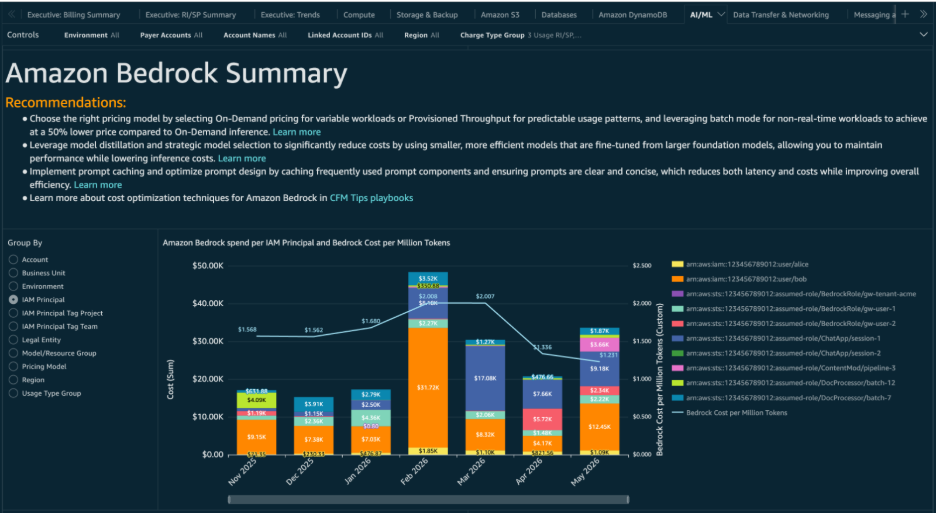
Image credit: AWS Machine Learning, Amazon Bedrock cost attribution with Athena and CUDOS.
The 5.8 Bedrock section gives you:
- Flexible grouping — by IAM Principal, IAM Principal Tags (Project/Team), Model/Resource Group, or Region.
- Cost-per-million-tokens trend — a line overlaid on spend so you can see the impact of a model switch or prompt caching.
- Interactive drill-down — click any value in the top chart and every other visual filters to it, with no navigation away.
- Granular model/usage breakdown — spend per model and per usage type for the selected filter.
If you already run CUDOS, follow the update guidance to reach 5.8 (or use “add organizational taxonomy” to bolt IAM Principal data onto an existing dashboard). You can also explore the Bedrock section in AWS’s interactive demo dashboard first.
How much does this cost to run?
Athena bills only for the queries you actually run, charged by data scanned at $5 per TB with a 10 MB minimum per query (Amazon Bedrock cost attribution walkthrough). Because the table uses Hive partition projection on billing_period, a query scoped to one month scans only that month’s Parquet folder — typically well under 10 MB, about $0.00005 per query. The rule of thumb: always add a WHERE billing_period = ... filter and select only the columns you need instead of SELECT *.
Clean up
When you are done experimenting, drop the Athena table and the AWS Glue database. These are metadata only — no compute is running — so removal is safe and stops any future query charges (Amazon Bedrock cost attribution walkthrough).
Editorial note: Citation cleanup: we trimmed duplicate citation links that repeated the same source after multiple paragraphs. Every fact and quote is unchanged; the source remains cited where each claim appears.