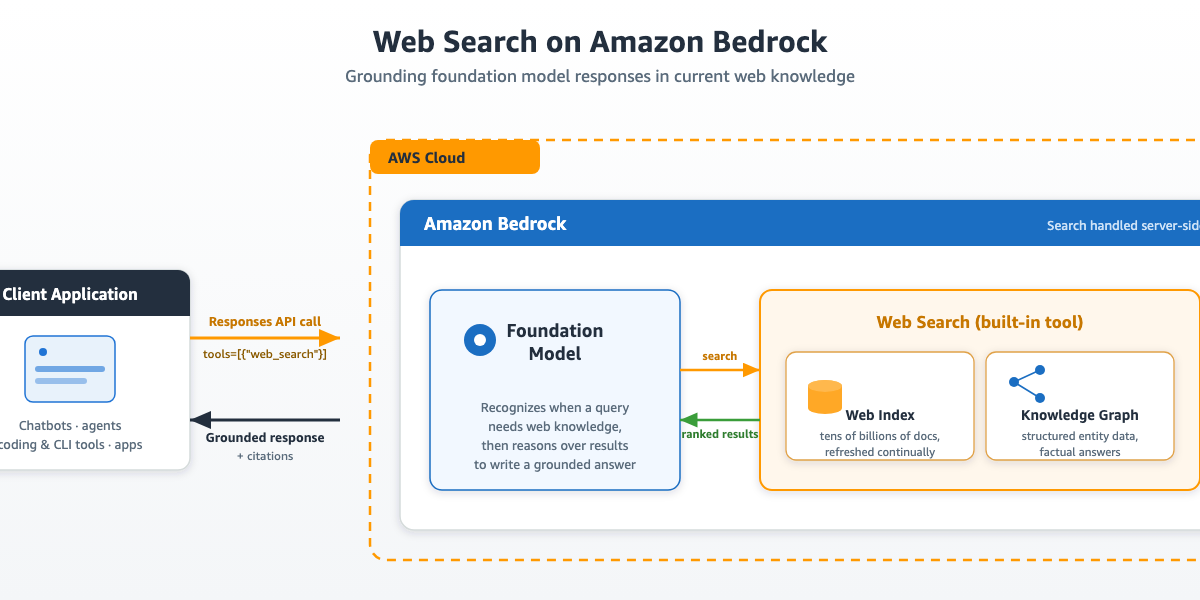
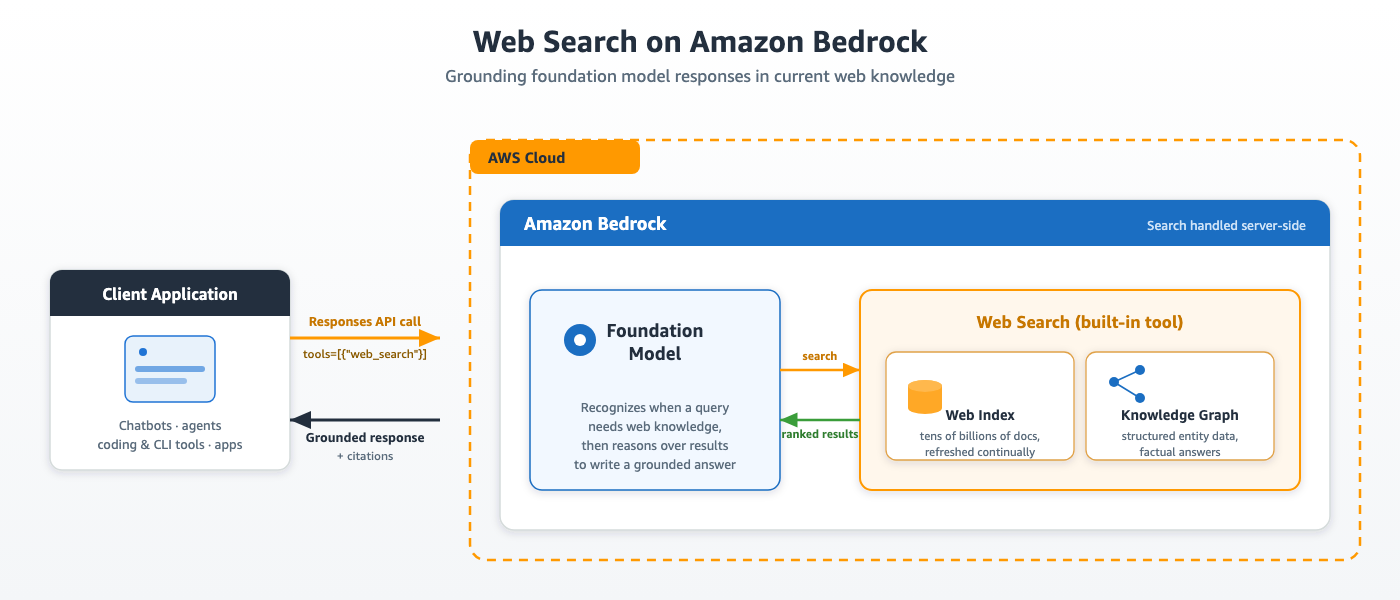
Image: AWS Machine Learning — Web Search on Amazon Bedrock feature architecture
Foundation models routinely face questions about recent earnings calls, regulatory updates, or current events that fall outside their training window. Grounding those models in live web knowledge closes the gap — whether the application is a chatbot, coding assistant, CLI tool, or enterprise service. Grounding helps answer questions beyond the model’s training data and reduces hallucinations Amazon Web Services blog post on introducing web search on Amazon Bedrock.
In the past, adding live web knowledge to an AI model meant signing up for a separate search vendor, managing API keys, handling rate limits, and carrying out security reviews for each provider. That workflow adds weeks to a project and creates ongoing operational toil. AWS unveiled Web Search on AgentCore at its New York Summit in 2026, and it has now brought the same capability directly into Amazon Bedrock. It is a server-side capability built into Amazon Bedrock that grounds model answers with live web information. Because the search infrastructure runs within AWS, you avoid the delays of third-party vendor onboarding, external API orchestration, and additional security reviews.
This guide explains what Web Search on Amazon Bedrock provides, how to enable it for OpenAI-compatible API calls, and how to read the structured citations it returns. The steps below are written for developers who already have an AWS account with Bedrock access and want to add live web grounding without building a client-side tool-use loop.
What you will learn
- How Web Search on Amazon Bedrock differs from third-party grounding providers
- The exact IAM permissions and credential setup required
- Step-by-step: Enable Web Search with a single parameter in an OpenAI-compatible API call
- Step-by-step: Extract structured source citations from the grounded response
- Compliance and observability considerations with CloudTrail
- Availability regions and pricing model
What you need (prerequisites)
| Requirement | Details | Where to get |
|---|---|---|
| AWS account | Active account with Amazon Bedrock access | AWS Console |
| IAM identity | IAM role, AWS CLI profile, or environment variables | AWS IAM Console |
| OpenAI-compatible client | Python openai SDK or equivalent |
PyPI |
| Python package | aws-bedrock-token-generator for bearer tokens |
PyPI |
| Region | us-east-1, us-east-2, or us-west-2 for in-region processing |
AWS Region selector |
Note: Web Search operates entirely within Amazon Bedrock’s infrastructure, supporting customers’ compliance requirements. By default, it offers zero data egress, so your data never leaves the AWS environment Amazon Bedrock Web Search documentation.
Capabilities of Web Search on Amazon Bedrock
Unlike third-party search vendors, Web Search runs natively inside Amazon Bedrock’s inference pipeline. Its design rests on four pillars:
Multi-source grounding. Instead of relying on a single web index, Bedrock combines its own continuously refreshed index with an internal knowledge graph that maps entities and their relationships. For factual questions — such as identifying an author or the year of a historical event — the knowledge graph supplies a high-confidence answer directly, which reduces the small factual errors that appear when a model stitches together an answer from scattered web snippets Amazon Web Services blog post on introducing web search on Amazon Bedrock.
Context-efficient retrieval. Instead of dumping an entire webpage into the model’s context and hoping it locates the relevant section, Web Search extracts semantic snippets from each result. It pulls only the passages that relate to the query and formats them for the model’s context window. The model receives the information that actually matters, with less token waste on surrounding boilerplate. Because the retrieval step is fast, Bedrock can return a grounded response with minimal added latency.
Single-parameter enablement. Activating Web Search requires only one addition to your existing OpenAI-compatible API request: a tools entry. You do not need to register a new vendor, provision extra API keys, build an orchestration layer, or pull in a separate SDK.
Enterprise-grade compliance by default. Web Search on Bedrock keeps all retrieval data inside your AWS environment by default, eliminating any third-party data egress concerns. Future features that might expose data will require your explicit opt-in, and AWS will publish updated guidance as those capabilities arrive Amazon Bedrock Web Search documentation.
Step-by-step instructions
Step 1: Configure authentication and permissions
Web Search relies on the AWS credentials your environment already uses — no separate API keys are required. Make sure your deployment has credentials accessible through the standard AWS chain: an IAM role attached to the compute, an AWS CLI profile, or environment variables. Those same credentials authenticate every request sent to the bedrock-mantle endpoint.
The calling identity needs two sets of permissions:
- Inference permissions on Amazon Bedrock, so the model call itself succeeds. Attach the
AmazonBedrockMantleInferenceAccessmanaged policy, or grant the specific inference actions your call requires. - Tool permissions for Web Search, so the model can invoke the search capability during inference. The minimum grant is
bedrock-websearch:InvokeSearch; includebedrock-websearch:InvokeFetchif you want the model to read a result’s full page content. Live-web retrieval additionally requiresbedrock-websearch:ExternalWebAccess, which is the default request behavior — if your identity does not have it, setexternal_web_access: falseon the tool. IfInvokeSearchpermission is missing, Bedrock silently skips the search step and the model responds using only its pre-training knowledge.
The API authenticates every request with a short-lived bearer token generated from your existing AWS IAM credentials via SigV4. You can mint this token with the aws-bedrock-token-generator package, which packages the credential in the format the OpenAI client expects for its api_key parameter. No additional key management is required Amazon Web Services blog post on introducing web search on Amazon Bedrock.

Image: AWS Machine Learning — Web Search IAM permission configuration in Amazon Bedrock
Step 2: Enable Web Search in an API call
The Responses API treats tools as first-class citizens, which means Web Search does not require you to write a custom function schema or maintain a client-side tool-use loop. To add it to an existing Bedrock workflow, you only need to prepare your AWS credentials, point the OpenAI client at the bedrock-mantle endpoint, and insert the Web Search tool definition into your request. When it launched, Web Search supported OpenAI-compatible models running on Amazon Bedrock’s next-generation inference engine Amazon Web Services blog post on introducing web search on Amazon Bedrock.
Start from a standard call. A normal Responses API call, without grounding, looks like this:
response = client.responses.create(
    model="openai.gpt-5.4",
    input="What were the key announcements at AWS re:Invent 2025?",
)
To ground that same call in web knowledge, add a single tools entry:
tools=[{"type": "web_search", "external_web_access": False}]
The external_web_access setting controls whether Bedrock pulls from its pre-indexed web corpus or fetches live pages directly. Right now, only the indexed corpus is active. Live-web fetching will arrive in a later update, and the parameter is already present in the API so existing code requires no changes when that launches. Leaving external_web_access at its default true demands the bedrock-websearch:ExternalWebAccess permission; setting it to false lets you skip that extra grant.
Step 3: Read the grounded response with citations
Putting it together, here is the complete end-to-end example, including how to extract the source citations:
from openai import OpenAI
from aws_bedrock_token_generator import provide_token

REGION = "us-east-1"
client = OpenAI(
    base_url=f"https://bedrock-mantle.{REGION}.api.aws/openai/v1",
    api_key=provide_token(region=REGION),
)

response = client.responses.create(
    model="openai.gpt-5.4",
    input="What were the key announcements at AWS re:Invent 2025?",
    tools=[{"type": "web_search", "external_web_access": False}],
)

searches = [item for item in response.output if item.type == "web_search_call"]
print(f"Retrieval steps: {len(searches)}")
for call in searches:
    if call.action.type == "search":
        print(f" search: {call.action.queries}")
    elif call.action.type == "open_page":
        print(f" open_page: {call.action.url}")

for item in response.output:
    if item.type == "message":
        for content in item.content:
            if content.type == "output_text":
                print(content.text)
                for citation in content.annotations or []:
                    if citation.type == "url_citation":
                        print(f" [{citation.title}] {citation.url}")
The above code produces output similar to the following (abridged):
Retrieval steps: 2
search: ['AWS re:Invent 2025 key announcements official AWS blog keynote recap']
open_page: https://aws.amazon.com/blogs/aws/top-announcements-of-aws-reinvent-2025

The biggest AWS re:Invent 2025 announcements clustered around AI agents, custom silicon/infrastructure, and developer productivity. ...
[Top announcements of AWS re:Invent 2025 | AWS News Blog] https://aws.amazon.com/blogs/aws/top-announcements-of-aws-reinvent-2025
[AWS re:Invent 2025: Amazon announces Nova 2, Trainium3, frontier agents] https://...
In this example, the request contains a Web Search entry inside the tools array. Bedrock performs the search entirely on its servers and sends back a grounded response in one round-trip. You do not need to declare a function schema or maintain a client-side tool-use loop. Each citation arrives as a url_citation object nested in the message content’s annotations array. Its wire shape is:
{
  "type": "url_citation",
  "start_index": 120,
  "end_index": 303,
  "title": "Top announcements of AWS re:Invent 2025 | AWS News Blog",
  "url": "https://aws.amazon.com/blogs/aws/top-announcements-of-aws-reinvent-2025"
}
The start_index and end_index fields mark character positions inside output_text, so you can attach inline footnotes or highlight precisely which portion of the response each citation covers Amazon Web Services blog post on introducing web search on Amazon Bedrock.
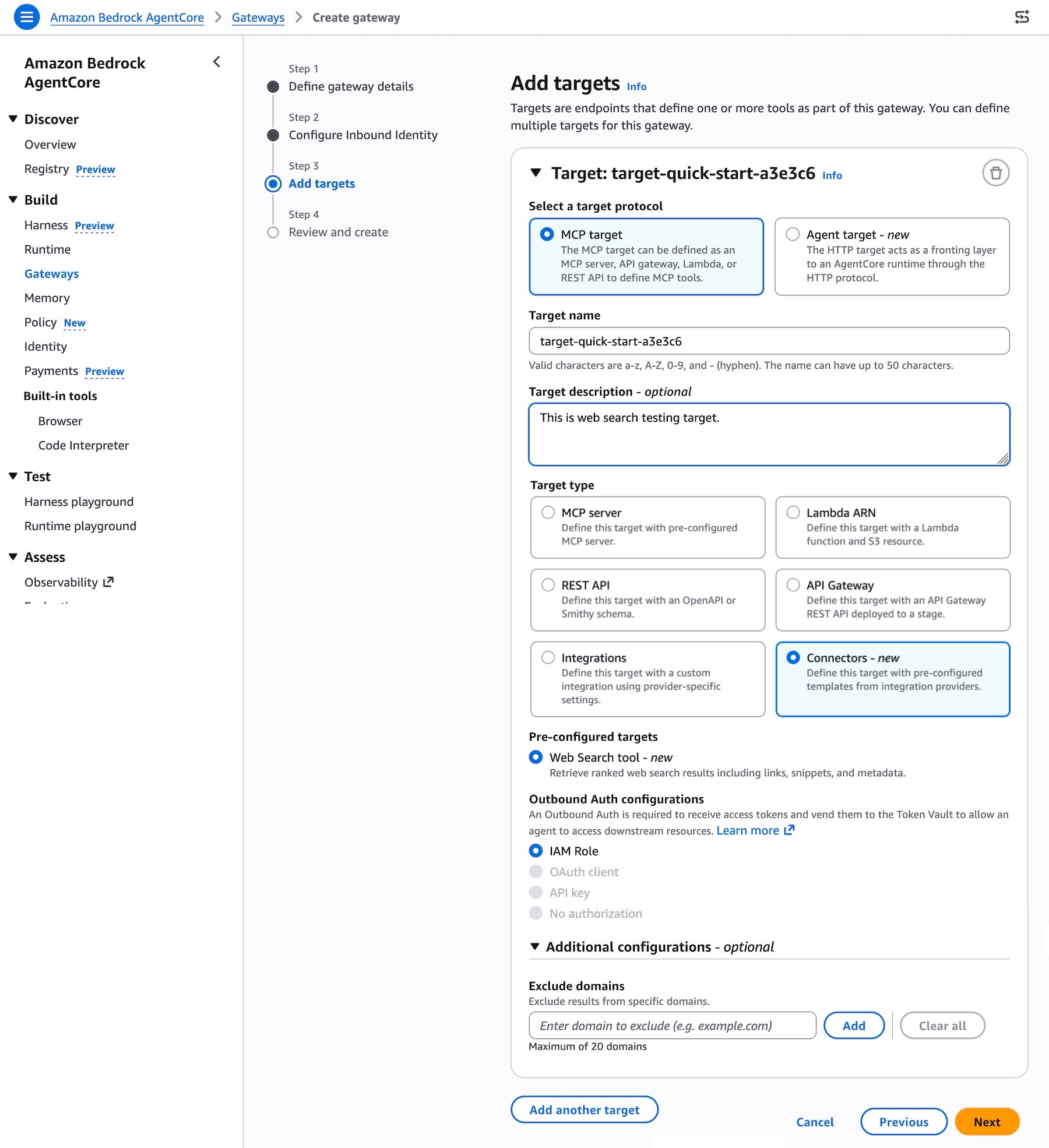
Image: AWS News Blog — Adding a Web Search tool target to a Bedrock AgentCore Gateway
Auditing and observability
AWS CloudTrail records every Web Search call by default. Each invocation of bedrock-websearch:InvokeSearch or bedrock-websearch:InvokeFetch appears as a management event, logging the caller’s identity, timestamp, action, and source context — including any forward-access-session originator — plus the AWS account and Region. When a request is rejected, CloudTrail captures the exact condition key behind the denial, which speeds up IAM troubleshooting without requiring extra trail configuration Amazon Web Services blog post on introducing web search on Amazon Bedrock.
For privacy reasons, CloudTrail logs exclude the actual search queries, result URLs, and fetched page text. Search terms receive the same protection as inference prompts and never appear in trail events. Together with in-Region processing and zero data egress, this design gives security and compliance teams a complete usage audit trail without exposing what individual users searched for.
When to use Web Search
Web Search is worth enabling whenever an answer depends on information that is more recent, more specialized, or more authoritative than what the model already knows. Recency is one common case: current events, recent product releases, prices, or documentation for a new library version. It is equally useful for long-tail or specialized questions where the model’s knowledge is thin or imprecise — such as niche APIs, specific configuration values, or domain-specific facts — and for cases where you want a grounded, citable source rather than a recollection Amazon Bedrock Web Search documentation.
This feature does not replace internal RAG systems that need strict document governance. Web Search queries Amazon’s public web index and knowledge graph, making it ideal when public sources are an acceptable authority. For sensitive internal documents, continue routing requests through your existing knowledge base or private RAG infrastructure.
Availability and pricing
Web Search on Bedrock is generally available in the US, with in-region query handling in us-east-1, us-east-2, and us-west-2. For pricing details, see the Amazon Bedrock pricing page. To get started, see the Web Search documentation for complete API references and examples.
Related: grounding AI agents with AgentCore
If you are building autonomous agents rather than single-turn chatbots, AWS also offers Web Search as a preconfigured target on the Bedrock AgentCore Gateway. Through this integration, an agent submits a natural-language prompt and receives the most relevant snippets, source URLs, titles, and publication dates. The model then reasons over that retrieved material to compose a grounded answer. This capability is built on Amazon’s search infrastructure, informed by years of experience powering agentic search experiences across Alexa+, Amazon Quick, and Kiro Announcing Web Search on Amazon Bedrock AgentCore.
For developers building multi-agent systems, the AgentCore approach centralizes tool management and avoids duplicating web-search logic across every agent instance. Microsoft’s recent Build 2026 announcements also emphasized model-native search stacks and agent frameworks as a complement to vendor-managed grounding solutions like Bedrock’s Microsoft Build 2026: Web IQ Search Stack, MAI Model Family.
If you are already securing Bedrock agents with temporal policies and rate limits, Web Search fits cleanly into that governance layer. The bedrock-websearch:InvokeSearch and bedrock-websearch:InvokeFetch actions can be scoped alongside your existing Bedrock IAM policies, and CloudTrail gives you the same observability surface you already use for model inference Securing AI agents with temporal policies in Amazon Bedrock.
Conclusion
Amazon Bedrock’s native Web Search eliminates the operational burden of wiring foundation models to live web data. Developers get grounded, multi-source answers with low latency by adding one parameter to an existing API call, without the overhead of vendor management, custom orchestration, or repeated compliance reviews. For full API coverage and additional examples, see the Web Search documentation; for current pricing, see the Amazon Bedrock pricing page.
Editorial note: Citation cleanup: we trimmed duplicate citation links that repeated the same source after multiple paragraphs. Every fact and quote is unchanged; the source remains cited where each claim appears.