Traditional access controls treat every request as an isolated event. That model worked when applications followed deterministic business logic, but AI agents decide at runtime which tools to call, with which arguments, and in what order. A lookup tool that is safe in isolation can become dangerous when its output feeds a money-transfer tool two calls later. The gap between stateless permission checks and stateful agent behavior is where most agent security incidents start.
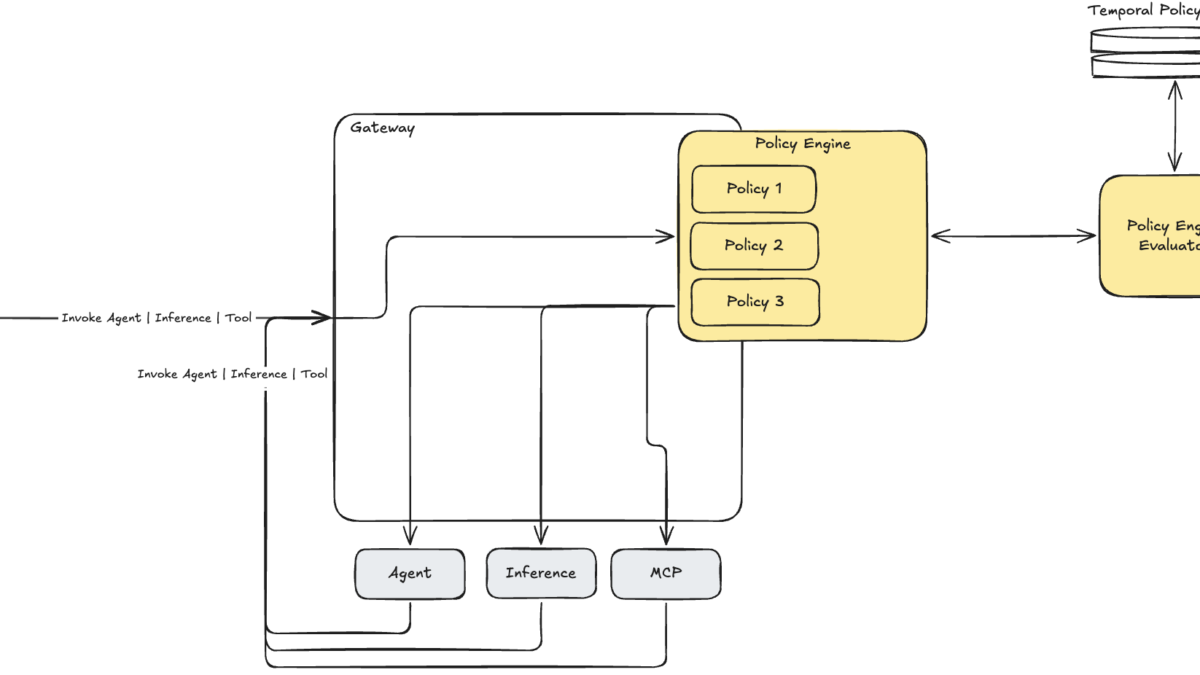
Amazon Bedrock AgentCore now addresses that gap with temporal policies: authorization rules that evaluate the current request against the agent’s recent session history, not just the request itself. These policies run at the AgentCore Gateway perimeter, outside the agent’s code, so the agent cannot intercept or bypass them. This guide walks through what temporal policies are, why they matter, and how to implement them step by step for a production agent workflow.
Amazon Bedrock AgentCore platform overview — image: AWS
What you need before you start
Before writing temporal policies, confirm the following prerequisites are in place. According to the Amazon Bedrock AgentCore overview, the platform is designed to work with any framework and any model, but the temporal policy feature requires specific gateway and identity setup.
- An active AWS account with Amazon Bedrock AgentCore enabled. You need access to the Bedrock console and the ability to create policy engines.
- An AgentCore Gateway with at least one MCP target configured. The gateway must be routing your agent’s tool calls, model inference calls, or agent-to-agent calls. Temporal policies only evaluate traffic that flows through the gateway.
- A policy engine attached to the gateway. This is the container that holds your stateless and temporal policies. You can attach one through the AgentCore console or the AWS CLI.
- IAM permissions to create and manage policy resources. Your identity needs permissions to write policy rules and update enforcement modes.
If any of these pieces are missing, the gateway will not have the trajectory state or policy evaluation layer that temporal policies depend on.
Step 1 — Understand trajectories and sessions
Temporal policies operate on two concepts: trajectories and sessions. A trajectory is a bounded sequence of actions identified by a principal and a session ID. The policy engine records each action, its inputs, and its outputs as events in that trajectory. When a new request arrives, the engine evaluates temporal conditions against this recorded history.
A session defines the scope of that history. You decide what constitutes a session — it can be a single conversation, a multi-step task, or a longer workflow. The engine stores trajectory events for a maximum look-back window of 24 hours; anything older is automatically deleted. The AgentCore temporal policies documentation explains that a session is never defined by its ID alone: the engine combines the session ID with the end user’s identity to produce a unique session, so two different identities presenting the same session ID are treated as entirely separate sessions.
One additional rule governs policy updates. Whenever you change the policies in a policy engine, existing sessions are invalidated. This ensures every session is evaluated against the current set of policies and that each trajectory event is recorded with the expected schema.
Step 2 — Write your first temporal policy in Dogwood
Temporal policies use Dogwood, an open-source governance language compatible with Cedar. Because Dogwood extends Cedar, you can keep existing Cedar policies without migration. The policy engine evaluates temporal conditions on every request and returns a deterministic ALLOW or DENY decision.
A common first use case is workflow sequencing: enforcing that one tool runs before another. For example, you might require that an agent retrieves a client profile before loading a portfolio, and loads the portfolio before executing a trade. The following Dogwood rule enforces that sequence:
permit (principal, action == AgentCore::Action::"FinTarget___load_portfolio", resource == AgentCore::Gateway::<GATEWAY_ARN>)
  when temporal {
    formerly within 5m (AgentCore::Action::"FinTarget___get_client_profile"::response{eventResource: resource})
  };
This policy denies load_portfolio unless get_client_profile has completed within the last five minutes in the same trajectory. The formerly within 5m operator is the temporal condition that distinguishes this from a stateless policy. The agent cannot bypass this by reordering its tool calls or by injecting fake tool results, because the gateway verifies the actual recorded event see the temporal policies documentation.
A second policy extends the chain to the next step:
permit (principal, action == AgentCore::Action::"FinTarget___rebalance_portfolio", resource == AgentCore::Gateway::<GATEWAY_ARN>)
  when temporal {
    formerly within 5m (AgentCore::Action::"FinTarget___load_portfolio"::response{eventResource: resource})
  };
Together, these two rules enforce the exact sequence: profile, then portfolio, then rebalance. An agent that skips the profile step and jumps directly to rebalancing is denied regardless of its instructions. This is the same pattern you can apply to any multi-step workflow where order matters.

Agentic AI architecture reference — image: AWS
Step 3 — Enforce output integrity between tool calls
Workflow sequencing prevents bad ordering, but it does not prevent an agent from substituting fabricated values between steps. A more subtle attack vector is prompt injection that steers the agent to use a different identifier than what a prior tool actually returned. Temporal policies can bind the input of one tool call to the verified output of a previous call.
The following policy enforces that the portfolio_id passed to execute_trade exactly matches one of the portfolio IDs returned by get_client_profile:
permit (principal, action == AgentCore::Action::"execute_trade", resource)
  when temporal {
    formerly within 24h (
      AgentCore::Action::"get_client_profile"::response{
        input.profile_id: context.input.profile_id,
        eventResource: resource
      }
    )
  };
The policy correlates the current request’s input.profile_id with the response from the earlier profile lookup. If an attacker uses prompt injection to convince the LLM to fabricate a different ID, the policy denies the request because the value does not match what the CRM system actually returned. The temporal policies documentation describes this as correlating a matched event with the current request, which lets you express session-aware rules as policy instead of tracking events in agent or tool code.
Step 4 — Add data freshness and cumulative budget caps
Two other high-value temporal patterns are data freshness and cumulative exposure limits. In volatile environments, a market price that is sixty seconds old can represent significant drift. The following policy requires a fresh price lookup before any trade is authorized see the official blog post:
permit (principal, action == AgentCore::Action::"execute_trade", resource)
  when temporal {
    formerly within 30s (AgentCore::Action::"get_market_price"::response{eventResource: resource})
  };
The formerly within 30s operator forces the agent to refresh market data before every trade. Without this rule, an agent could act on a cached quote from a prior turn and make a decision based on stale information.
Cumulative budget caps contain the blast radius from runaway agents or successful attacks. The following policy limits total trade value in a single trajectory to sixty thousand dollars per the official blog post:
permit (principal, action == AgentCore::Action::"execute_trade", resource)
  when temporal {
    exists (total: Long). (
      (sum amount for (amount: Long), (t: Timepoint).
        where (formerly within 24h (
          AgentCore::Action::"get_market_price"::request{input.cost: amount, eventResource: resource}
          && tp(t)
        ))
      ) == total && total < 60000
    )
  };
The sum operator accumulates the cost field from every get_market_price request in the last twenty-four hours. If the total exceeds the threshold, subsequent trade requests are denied. This protects against compromised agents that execute dozens of small transactions in a loop, each of which would pass a stateless check individually.
For more context on how Amazon Bedrock AgentCore handles agent infrastructure at scale, see our article on running production AI agents in n8n with Amazon Bedrock AgentCore.
Step 5 — Configure human approval and session idle timeouts
Not every policy is about preventing bad data. Some are about enforcing human oversight. Temporal policies can require an explicit approval event before privileged actions execute. The following pattern blocks destructive or sensitive tool calls until an approval action is recorded in the trajectory:
forbid (principal, action == AgentCore::Action::"execute_trade", resource)
  when temporal {
    ! formerly within 1h (AgentCore::Action::"advisor_approve"::response{eventResource: resource})
  };
This rule denies any trade that does not have a corresponding approval event within the last hour. The approval event itself is a regular tool call or action that an advisor triggers through the application, so the policy integrates with your existing UI workflow per the temporal policies documentation.
You can also automatically downgrade permissions when an agent operates without human engagement. For example, after fifteen minutes without advisor interaction, the agent can lose access to write operations:
forbid (principal, action in [AgentCore::Action::"execute_trade", AgentCore::Action::"rebalance_portfolio"], resource)
  when temporal {
    ! formerly within 15m (AgentCore::Action::"advisor_interact"::response{})
  };
This pattern is useful for unattended agents that should not maintain full write access indefinitely per the official blog post. The Amazon Bedrock AgentCore rate limits and control article covers complementary gateway-level controls for cost and behavior.
Step 6 — Test in LOG_ONLY mode before enforcing
Temporal policies support a LOG_ONLY mode that records what the policy would decide without actually denying requests. This is the recommended way to validate new rules before promoting them to ENFORCE mode. According to the official AgentCore blog on securing AI agents, switching existing policies or policy engines to LOG_ONLY mode is not recommended for production workloads, but using LOG_ONLY on individual new policies during testing is the safe path.
To test, set the enforcement mode of your new temporal policy to LOG_ONLY and exercise the agent with realistic traffic. Review the logs to confirm the policy fires exactly when you expect and does not produce false positives on legitimate sequences. Once you are confident in the rule, update its mode to ENFORCE.
Step 7 — Monitor decisions via observability
Every temporal policy evaluation is logged with full context: the current request, the matched historical events, and the final ALLOW or DENY decision. Because the policy engine operates at the gateway, you have a single consistent audit trail for all tool calls, model inference calls, and agent-to-agent calls.
Use this log data to iterate on your policies. If you see repeated false denials, widen the time window or adjust the action conditions. If you see denials that should have fired but did not, verify that the session ID and principal are being passed correctly in the x-amzn-bedrock-agentcore-policy-session-id header. The gateway generates a session ID for you if none is provided, but a new session ID starts with an empty trajectory, which can make policies appear to not fire.
The bottom line
Temporal policies close the authorization gap between stateless access controls and stateful agent behavior. By evaluating each request against the agent’s recent trajectory, they enforce ordering, data freshness, output integrity, cumulative budgets, and human approval in a way the agent cannot circumvent. The implementation path is straightforward: attach a policy engine to your gateway, write Dogwood rules with temporal operators, test in LOG_ONLY mode, and promote to ENFORCE once the logs confirm correct behavior. For teams already using Cedar, the migration is minimal because Dogwood is compatible with existing policies.
If your agent already routes through AgentCore Gateway, temporal policies are the next logical control layer. Start with one workflow-sequencing rule, validate it against real traffic, then expand to output integrity and budget caps. The platform records every decision, so you can refine policies with evidence rather than guesswork.
Last verified August 11, 2026 against the AWS Machine Learning blog post and the AgentCore temporal policies documentation.
Editorial note: Citation cleanup: we trimmed duplicate citation links that repeated the same source after multiple paragraphs. Every fact and quote is unchanged; the source remains cited where each claim appears.